.htaccess

.htaccess (short for “hypertext access”) is a configuration file for web servers, above all the widely used Apache server. It lets you define rules for individual directories of a website without changing the central server configuration. It applies to the directory in which it is located and all subdirectories. A classic use case is access protection: an .htaccess file can protect a directory with HTTP authentication – anyone calling up the address sees a window asking for a username and password. This is used, for example, to hide a shop's staging or test environment from visitors and search engines. The concept originally comes from the NCSA web server, one of the very first web servers. Other servers such as nginx don't support .htaccess; the same rules are stored directly in the server configuration there.
Uses of .htaccess
.htaccess is a simple text file containing various directives. The most common uses include: setting up redirects, such as 301 redirects from old to new URLs after a relaunch; forcing HTTPS and defining a uniform domain variant (with or without www); defining custom error pages, for example for 404 errors; blocking certain IP addresses; setting caching and compression rules to improve loading times; and rewriting URLs (mod_rewrite) so that descriptive addresses are shown instead of technical parameters. Changes to .htaccess take effect immediately because the server reads the file anew with every request.
However, this is exactly what can become a performance problem. If an .htaccess file contains a large number of rules – thousands of individual redirects after a major shop relaunch, for example – the server has to process them on every page request. For large redirect lists, it's therefore better to work with patterns (regular expressions), move the rules into the central server configuration or manage redirects via the shop system. The order of the rules is also important to avoid redirect chains or loops. Errors in .htaccess can take a website down completely; changes should therefore always be tested in a test environment first. Incidentally, hosted systems such as Shopify offer no access to .htaccess; redirects are created in the admin area there.
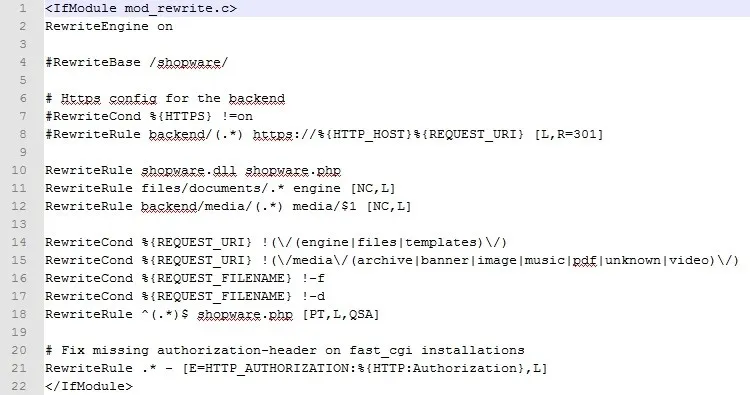
Example .htaccess from Shopware: