
Shopware accessibility and the European Accessibility Act: what Shopware delivers and where shops still fail
At a glance
Who is affected
The European Accessibility Act has applied since 28 June 2025 and has been implemented by the EU member states, in Germany as the Barrierefreiheitsstärkungsgesetz (BFSG). Taking the German law as an example, three questions are decisive for online shops:
Do you sell to consumers? Covered are e-commerce services offered for concluding a consumer contract. A pure B2B shop that only sells to businesses is not covered.
Are you a microenterprise? Microenterprises providing services are exempt: fewer than ten employees and an annual turnover or balance sheet total of at most two million euros. Both conditions must be met at the same time. A shop with three employees and three million euros in revenue is not exempt.
Do you sell products that are themselves covered? Such as certain hardware or e-readers. For such products there is no exemption for microenterprises.
The details differ between EU member states. Shops based in Switzerland are not directly subject to the BFSG; anyone selling to consumers in the EU should have it checked which requirements from the European Accessibility Act apply to them.
Who enforces it, and what is at stake
In Germany, the responsible authority is the joint market surveillance body of the federal states for accessibility of products and services (MLBF) in Magdeburg. Consumers can report barriers there and file formal requests. The authority can object to deficiencies, demand corrections and in the extreme case prohibit the service. Fines of up to 100,000 euros are possible. According to the German chambers of commerce, warning letters from competitors or qualified associations come on top. Reliable case law on this is still at an early stage. A lawyer belongs in the legal assessment of your own shop.
What "accessible" means in a shop
What is meant is the entire purchase journey: home page, navigation, search, filters, product page, variant selection, cart, checkout, customer account, contact form. In practice, the technical benchmark is the Web Content Accessibility Guidelines WCAG 2.1 at level AA, which the European standard EN 301 549 also refers to. The key requirements in everyday language:
Operable without a mouse: every function must be reachable by keyboard, with a visible focus and a logical order.
Understandable for screen readers: images with alternative text, labelled form fields, a clean heading structure, the correct language in the source code.
Readable: sufficient contrast, text that can be enlarged without loss of function, error messages not only in red.
Robust: content that changes dynamically, such as an updated cart, is also announced to assistive technologies.
What Shopware delivers
According to its developer documentation, Shopware has committed to meeting WCAG 2.1 level AA and the German BITV 2.0 in the storefront. The storefront uses Bootstrap components with good foundations, and Shopware tests its storefront with automated tests and axe as well as with screen readers, keyboard operation and contrast analysis.
What matters is how these improvements are delivered:
Improvements came from Shopware 6.6 and more with 6.7, spread across regular minor releases. There is no single "accessibility update".
In 6.6, Shopware hid changes that could break existing templates behind the feature flag `ACCESSIBILITY_TWEAKS`. They were off by default there. Only with Shopware 6.7 are all improvements the default.
Shopware itself lists open accessibility issues on GitHub. The work is therefore not finished.
The consequence for merchants: a shop on Shopware 6.5 does not get these improvements. A shop on 6.6 only gets the important structural changes with the flag enabled. Anyone who takes accessibility seriously can hardly avoid an update to 6.7. How an update is planned is covered in the article Shopware 6 update.
Where shops still fail
The custom theme
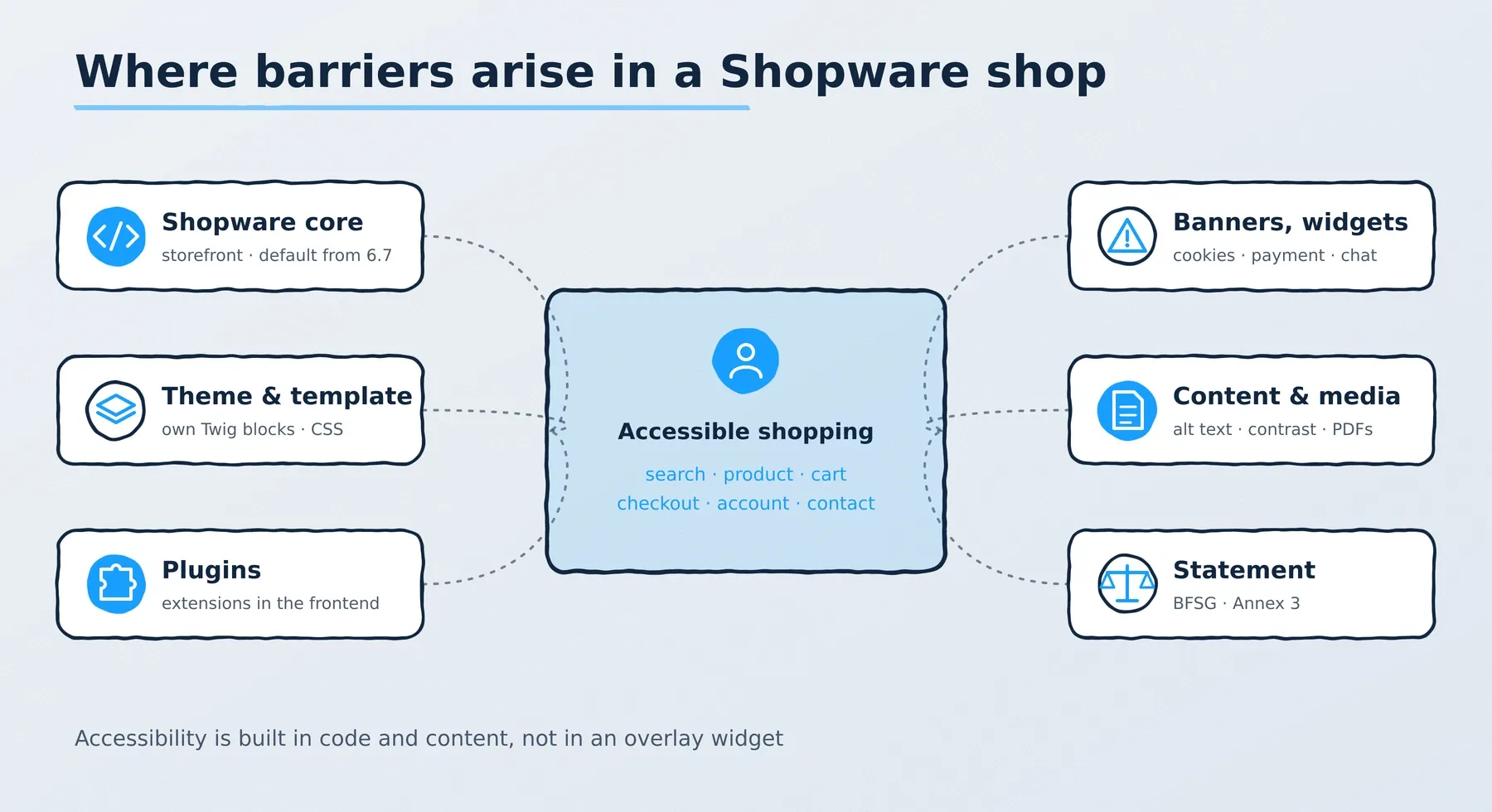
Almost every professional Shopware shop has its own theme that overrides Twig blocks of the storefront. That is exactly where Shopware's improvements do not take effect: anyone who replaces a block completely keeps their old code, even after the update. Shopware itself points out that accessible changes to the HTML structure can break extensions that customise these areas. Typical theme barriers: brand colours with too little contrast, removed focus outlines because they look "ugly", custom sliders and mega menus without keyboard operation, icons without labels.
Plugins in the frontend
Every plugin that displays something in the storefront brings its own HTML: product configurators, filters, wish lists, reviews, popups, payment methods with their own forms. Whether these are accessible is up to the respective vendor and must be checked.
Cookie banners and widgets
The cookie banner is the first thing a customer sees, and it often blocks the whole page. If it cannot be operated by keyboard or read by a screen reader, the entire shop is unusable, no matter how good the rest is. The same applies to chat windows, newsletter popups and embedded third-party payment forms.
Content and media
Much is created not in code but in maintenance: product images without alternative text, text in images, headings in Shopping Experiences chosen only for looks, videos without subtitles, PDFs such as data sheets or size charts that are not accessible. That is the merchant's task, not Shopware's or the agency's alone.
Overlay widgets
Many shops have added an accessibility widget that offers contrast, font sizes or read-aloud functions at the push of a button. The German federal and state monitoring bodies for accessible information technology have published a joint assessment: a non-accessible website does not necessarily become accessible through an overlay tool, and the tool does not release anyone from making the website fundamentally accessible. An overlay does not change the source code. Missing labels and keyboard traps remain.
The accessibility statement
In addition to the accessible shop, the BFSG requires information on how the service meets the requirements. According to Annex 3 of the law, it belongs in the terms and conditions or in the shop in another clearly perceivable way, itself in accessible form. Content includes:
a general description of the service in an accessible format
explanations needed to understand how the service is delivered
a description of how the service meets the requirements
the competent market surveillance authority
The information must be kept available for as long as the service is offered. A statement claiming accessibility the shop does not have is not protection but an attack surface.
How a Shopware shop becomes accessible
Clarify whether you are affected: consumer sales, company size, products. Have it checked legally if in doubt.
Check the version: is the shop on 6.7? If not, plan an update, because only there are all of Shopware's improvements the default.
Have it audited, not just scanned: automated tests only find part of the problems. Keyboard operation, screen readers and the logic of checkout are checked by a person.
Purchase journey first: cookie banner, navigation, search, product page, cart and checkout before blog and subpages.
Bring theme and plugins up to date: compare overridden blocks with Shopware's improvements, fix contrast and focus, hold plugin vendors to account or replace plugins.
Maintain content: alternative texts, headings, subtitles, accessible documents. Ideally as a fixed rule in the editorial team.
Publish the statement: honest, complete, with the market surveillance authority.
Secure it permanently: every update, every new plugin and every new Shopping Experience can bring new barriers. Accessibility belongs in the acceptance of every change.
Accessibility pays off for SEO and AI visibility
Much of what accessibility requires also helps search engines and AI systems such as ChatGPT, Gemini, Perplexity and Claude: a clean heading structure, labelled elements, alternative texts for images, clear link texts and semantic HTML. A shop a screen reader understands is also easier for machines to read. More on the pages Shopware SEO and GEO for online stores.
Silent errors in accessibility
Accessibility is not a project with an end date. A plugin update swaps the cookie banner, a new campaign brings a popup without a keyboard close button, a Shopping Experience shows text only in an image. In daily operations nobody notices, because almost everyone on the team works with a mouse and good eyesight. At arboro we call these silent errors, which is why checking for barriers belongs in every release for us, not only in a one-off audit.
How we do it at arboro
It starts with an honest inventory: version, theme, plugins, cookie banner, checkout and content, checked with tools and by hand. This results in a prioritised plan, purchase journey first, with a clear separation of what is a Shopware update, what is theme work, what is a plugin issue and what is a task for the editorial team. For the legal assessment you work with your lawyer. We advise, you decide. Then we take responsibility for the implementation and make sure new releases do not bring new barriers.
For analysis and implementation: Shopware & Shopify development. For ongoing responsibility with an SLA: Shopware & Shopify support.
Sources

Frequently asked questions
Under the European Accessibility Act, yes, if you sell to consumers in the EU and are not a microenterprise. In Germany, service providers with fewer than ten employees and at most two million euros turnover or balance sheet total are exempt, as are pure B2B shops.
Shopware has committed to meeting WCAG 2.1 AA in the storefront and has improved a lot since 6.6. However, all improvements are only the default from 6.7, and every shop has to make its own themes, plugins, cookie banners and content accessible.
In Shopware 6.6, accessibility changes that could break existing templates were hidden behind this flag and off by default. With Shopware 6.7 they are the default.
No. According to the German federal and state monitoring bodies, a non-accessible website does not necessarily become accessible through an overlay tool. The widget does not change the source code.
According to Annex 3 of the German BFSG: a description of the service, explanations of how it is delivered, how the requirements are met and the competent market surveillance authority. Published in the terms and conditions or in another clearly perceivable way.
In Germany, market surveillance can demand corrections and in the extreme case prohibit the service. Fines of up to 100,000 euros are possible, plus possible warning letters from competitors or associations.
How accessible is your shop really?
Version, theme, plugins, cookie banner, checkout and content reviewed, with tools and by hand. Then a prioritised plan, purchase journey first.