
Shopware maintenance contract: what it covers and what it costs
A Shopware maintenance contract defines who installs updates and security patches, who checks backups, who monitors the shop and how quickly a fault is dealt with. Costs usually consist of a fixed monthly fee plus the effort for individual tasks. At arboro, SLA-1 with monitoring costs €99 per month excl. VAT, and work is billed at €150 per hour, per minute.
At a glance
SLA-1 and SLA-2 compared
| Service | SLA-1 | Most popularSLA-2 |
|---|---|---|
| Monthly price (excl. VAT) | €99 per month | €500 per month, €299 for Shopify |
| Plugin updates and security hotfixes | by effort, billed per minute | included every month |
| Check interval availability and load time | every 5 minutes | every minute |
| Check interval simulated purchase | every 15 minutes | every 5 minutes |
| Monitoring in arboro.PULSE | shop, server and feed | extended, with more detail per area |
| Application monitoring with Tideways | not included | included |
| Response | contractually defined | faster response times |
| Jour fixe and consulting | not included | optional |
| Weekend | not included | SOS team channel without guarantee, direct number of the managing director |
| Custom development | by effort, billed per minute | by effort, billed per minute |
- Most popular
SLA-2
- Monthly price (excl. VAT)
- €500 per month, €299 for Shopify
- Plugin updates and security hotfixes
- included every month
- Check interval availability and load time
- every minute
- Check interval simulated purchase
- every 5 minutes
- Monitoring in arboro.PULSE
- extended, with more detail per area
- Application monitoring with Tideways
- included
- Response
- faster response times
- Jour fixe and consulting
- optional
- Weekend
- SOS team channel without guarantee, direct number of the managing director
- Custom development
- by effort, billed per minute
SLA-1
- Monthly price (excl. VAT)
- €99 per month
- Plugin updates and security hotfixes
- by effort, billed per minute
- Check interval availability and load time
- every 5 minutes
- Check interval simulated purchase
- every 15 minutes
- Monitoring in arboro.PULSE
- shop, server and feed
- Application monitoring with Tideways
- not included
- Response
- contractually defined
- Jour fixe and consulting
- not included
- Weekend
- not included
- Custom development
- by effort, billed per minute
At weekends, with SLA-2, error alerts from arboro.PULSE go to an SOS channel in the team. If a developer is available, they take care of it immediately. This cannot be guaranteed. In addition, SLA-2 customers have the managing director's direct number. Guaranteed weekend support comes with SLA-4.
SLA-3 and SLA-4 are available on request, with implementation starting the same day. All levels in detail: Shopware & Shopify support.
Why a Shopware shop needs a maintenance contract
A shop can be fully available while customers on iPhones can no longer pay. The server reports no error, the homepage loads, only the orders drop. That is exactly what you pay for with a maintenance contract: someone who finds and fixes such errors before they cost revenue for weeks.
An online shop is not a finished product but a system that changes constantly. According to its release policy, Shopware publishes a new minor version every month. Only the latest minor version is actively supported with bug and security fixes; older versions only receive security fixes via the Shopware Security Plugin. On top of that come updates for plugins, PHP, database and search server, changes at payment providers, and browser updates that break old code.
A maintenance contract defines who takes care of this, how often, at what price and with what response time. Without a contract, maintenance only happens when something is broken. By then the revenue is usually already lost.
What belongs in a Shopware maintenance contract
Updates
For self-hosted and PaaS shops the operator organises Shopware updates; with Shopware SaaS, Shopware updates the platform itself. For self-hosted and PaaS, Shopware updates, plugin updates and server software updates belong in the contract, with a clear rule on how they are applied: first on a staging system, then tested, then rolled out in a controlled way. Testing must cover not just the homepage and checkout but also interfaces to ERP, PIM and marketplaces, structured data and edge functions such as filters, search or vouchers. In shops we take over, we keep seeing the same results of untested updates: technical SEO errors, template changes not carried over and plugin conflicts that break edge functions.
How often to update depends on the shop. A shop with many plugins and an ERP integration needs more testing than a lean standard shop. More in the article Shopware 6 update.
Security patches
Security vulnerabilities do not wait for the next scheduled update. The contract should state that security fixes are prioritised and that the Shopware Security Plugin is installed, active and up to date. Shopware itself recommends this for all self-hosted and PaaS shops. What the plugin covers and what it does not is explained in the article Shopware security.
Backups and restore tests
A backup is only worth as much as its restore. Clarify three things in the contract:
Who backs up: for self-hosted shops usually the hosting provider. If this is not in writing, both sides rely on the other.
How far back: in its incident response guide, Shopware points out that an attack may have started long before it was discovered. If you keep only seven days of backups and notice an attack after three weeks, you no longer have a clean backup.
When was the last restore: a restore test shows whether the backup is complete and how long a restore takes. Without a test, it is an assumption.
How staging and backups work together is described in the article Shopware staging and backup.
Monitoring
Many contracts include server monitoring: is the server responding, is there enough memory and disk? Useful, but it says little about whether customers can buy. A payment method failing on iPhones, a feed suddenly missing 20% of products, an interface that stops syncing stock at night: in all these cases the server runs perfectly. So ask whether the checkout, orders and feed are monitored too, and who is notified on an alert.
Response times
Almost every contract states a response time. But it only starts when someone reports the error. The time before that is in no contract: the detection time. If a checkout error is only noticed after three weeks, a four-hour response time is little more than cosmetics. Look at both: how quickly an error is detected and how quickly action follows, including at weekends if your business requires it. At arboro, arboro.PULSE shows the response and resolution time of every ticket against your SLA.
Monthly report
A good report shows what was done, what is open and what comes next, with time spent per task. But it has a weakness: it arrives once a month. An error from the first week is three weeks old by the time the report appears. Better is access that lets you see the state of your shop yourself at any time. At arboro the conversation stays, the waiting goes: the arboro.PULSE cockpit shows at all times what has been done.
Checklist: what the contract should state
What a Shopware maintenance contract costs
There are three models on the market: pure hourly billing without a base fee, a flat rate with a fixed hour quota, and a fixed monthly fee for monitoring and availability plus effort for individual tasks. Quotas often expire if unused. Pure hourly billing sounds cheap but usually includes no monitoring and no committed response time.
arboro's prices are public:
SLA-1: €99 per month. Includes shop, server and feed monitoring via arboro.PULSE, the monitoring software licences and a contractually defined response time. Plugin updates and security hotfixes are billed by effort.
SLA-2: €500 per month. Adds monthly plugin updates and security hotfixes at no extra cost, faster response times, more detailed monitoring with more detail in arboro.PULSE and application monitoring with Tideways.
SLA-3 and SLA-4: on request, with implementation starting the same day; SLA-4 with guaranteed weekend support.
Work: €150 per hour, i.e. €2.50 per minute, billed per minute with no minimum charge. Tasks under three hours are done directly; from three hours, the responsible developer provides a cost estimate first and you approve.
All prices excl. VAT. The contract runs for six months and renews for another six months unless cancelled with one month's notice before the end of the term. Larger Shopware updates and further development are estimated individually, because effort depends heavily on plugins, interfaces and custom adjustments.
Example 1: small shop with around 200 orders per month
A Shopware shop with around 200 orders per month, an average basket of €75 and about 15 plugins, without ERP integration. That is around €15,000 revenue per month.
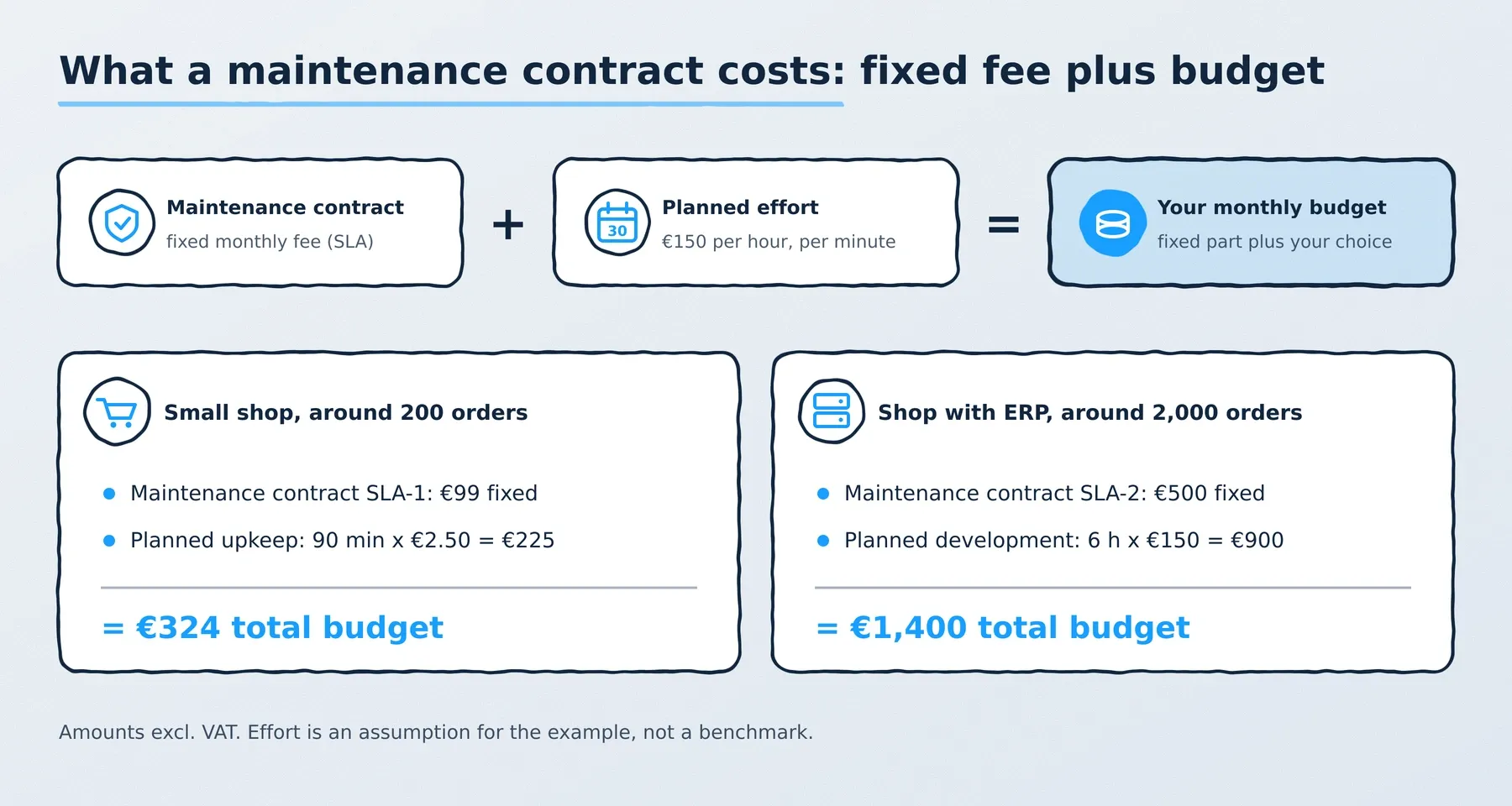
Maintenance contract SLA-1 with monitoring: €99 fixed per month
Planned upkeep by effort, assumed 90 minutes for plugin updates and small adjustments: 90 × €2.50 = €225
€99 maintenance contract + €225 planned upkeep = €324 total budget in the example
The fixed part is €99. You control the €225 yourself, because only what you commission gets done. On the risk side: if just one order in twenty fails, €750 of monthly revenue is at stake in this example.
Example 2: shop with ERP and around 2,000 orders per month
A Shopware shop with around 2,000 orders per month, ERP integration and regular extensions.
Maintenance contract SLA-2 with plugin updates and security hotfixes: €500 fixed per month
Planned development, assumed 6 hours per month: 6 × €150 = €900
€500 maintenance contract + €900 planned development = €1,400 total budget in the example
The maintenance itself costs €500 here. The €900 is budget for new features and adjustments, which you decide on month by month.
The assumed times are examples, not benchmarks. Actual effort depends on plugins, interfaces and your requirements, and you decide what gets implemented.
When SLA-2 pays off
The difference between SLA-1 and SLA-2 is €401 per month. With per-minute billing, SLA-2 becomes cheaper from 161 minutes per month. Only work included in SLA-2 counts, i.e. plugin updates and security hotfixes. Development as in example 2 does not belong in this calculation; it is billed by effort at both levels. On top, SLA-2 gives you faster response times, more detailed monitoring and Tideways. For Shopify shops SLA-2 costs €299; since Shopify runs the hosting, SLA-1 is usually enough there.
In-house or external?
An in-house Shopware developer knows the business and is quickly available. But this brings three risks: holidays and sickness, knowledge tied to one person, and the fact that one person rarely covers Shopware core, plugins, servers, SEO and tracking at the same time. Add a full salary with on-costs, training and tools.
External maintenance pays off if the shop should run reliably without you building your own team. A mix also works well: your in-house staff maintain content and products and do the visual testing after updates, while the agency takes responsibility for technology, updates and monitoring. That saves cost without giving up protection. In both cases it matters that code lives in a repository, that there is a staging system and that it is documented who holds which access.
Silent errors a contract without monitoring will not find
At arboro we call these silent errors. They cost revenue without the shop being offline for a single minute, and no customer reports them.
How arboro.PULSE makes maintenance visible
arboro.PULSE is arboro's client cockpit and is included in every SLA at no extra cost. In the background, diagnostic systems developed and run by arboro itself do the work. For maintenance, three areas matter: shop technology, tech stack and support tickets.
What is checked around the clock
Simulated purchase: step by step from homepage via product and cart to checkout, without a real order. Every 15 minutes with SLA-1, every 5 minutes with SLA-2.
Availability and technology: response time every 5 minutes or every minute, SSL certificate, domain expiry, security settings, load times by Core Web Vitals, tracking and cookie consent. A 90-day calendar shows every outage and its duration.
Signals from the data: orders and revenue compared with the usual pattern, checkout abandonment by device and browser from Google Analytics 4, usage of payment methods, plus approvals and rejected products in Merchant Center.
Tech stack: Shopware version and distance to the current version, extensions, hosting, payment methods and consent tools.
The test run shows whether the path to checkout works. The signals show whether real customers buy on all devices. Only both together find the iPhone problem from the beginning.
From alert to fix
Before an alert goes out, the system checks a second time. That keeps false alarms away. If the error is confirmed, the alert goes out by severity: notices by email or ticket, disruptions immediately via Microsoft Teams, critical errors such as a checkout failure additionally by SMS. You decide together with arboro who receives which alert, for example your IT lead or management.
Detect: the diagnostic systems report a deviation.
Assess: a developer checks the finding and identifies the cause.
Prioritise: outages, checkout errors and security issues first, then by visitors and revenue of the affected pages.
Fix: via your shop support under the terms of your SLA, tested on staging.
Prove: the item appears in the cockpit under "Done for you".
What you see in the cockpit
Overall score: a number from 0 to 100, a traffic light and one sentence in plain language.
Next up: the most important open items, sorted by priority and explained.
Done for you: what was fixed in the last 90 days, including what would never have been noticed.
Tickets and SLA: every request with its status, plus response and resolution times against your SLA.
Access is personal and protected by two-factor authentication. Pulse has read-only rights: it sees your figures but cannot change anything. Data is processed in the EU, and a data processing agreement is included.
Classic maintenance contract and arboro compared
| Question | Classic maintenance contract | arboro with arboro.PULSE |
|---|---|---|
| How is an error noticed? | Often by customers or own spot checks | Automatic checks around the clock |
| How do you learn how the shop is doing? | In the monthly report or meeting | Any time yourself, in the cockpit |
| How is work prioritised? | Often by arrival or number of errors | By business impact |
| How do you see what was done? | Task list in the report | "Done for you", always up to date |
| Is the response time met? | In the contract, rarely verifiable | Visible per ticket against the SLA |
arboro with arboro.PULSE
- How is an error noticed?
- Automatic checks around the clock
- How do you learn how the shop is doing?
- Any time yourself, in the cockpit
- How is work prioritised?
- By business impact
- How do you see what was done?
- "Done for you", always up to date
- Is the response time met?
- Visible per ticket against the SLA
Classic maintenance contract
- How is an error noticed?
- Often by customers or own spot checks
- How do you learn how the shop is doing?
- In the monthly report or meeting
- How is work prioritised?
- Often by arrival or number of errors
- How do you see what was done?
- Task list in the report
- Is the response time met?
- In the contract, rarely verifiable
30 days in one client shop
In October 2026, arboro.PULSE carried out 13,548 shop technology checks and 930 simulated test purchases through to checkout in a single client shop within 30 days, and measured 99.96% availability. These are real, anonymised figures. Nobody sees this work in a monthly report.
How we do it at arboro
For ongoing responsibility with monitoring and a binding response time, arboro concludes a support contract. In an acute outage, you can request emergency help without an existing contract, at the normal hourly rate. When a shop is taken over, it is analysed, logged and mapped, and from then on it is connected to arboro.PULSE around the clock. Updates go through staging, security fixes are prioritised. In the cockpit you can see what has been done at any time, without waiting for a report. How often regular updates happen is your decision. arboro advises, you decide.
All four support levels in detail: Shopware & Shopify support. How monitoring works: arboro.PULSE.
Sources

Frequently asked questions
At arboro, SLA-1 with shop, server and feed monitoring costs €99 per month, SLA-2 with monthly plugin updates and security hotfixes €500 per month, both excl. VAT. Work is billed at €150 per hour, per minute. In the example, a small shop with around 200 orders plans a total budget of €324 per month, of which €99 is fixed.
Updates of Shopware, plugins and server software tested on staging, prioritised security patches, backups with restore tests, monitoring that also covers checkout, orders and feed, clear response times and a traceable record of the work.
Yes, as soon as the shop generates regular revenue. Shopware releases new versions monthly, and errors such as a failed payment method do not report themselves. If just one order in twenty fails, €750 of monthly revenue is at stake at 200 orders and a €75 basket.
The contract must say so. For self-hosted shops the hosting provider usually backs up. Clarify how long backups are kept and when a restore was last tested, because an attack can begin long before it is discovered.
An in-house developer knows the business but is unavailable during holidays and sickness and rarely covers every area. External maintenance protects the shop without your own team. A mix works well: content and visual testing in-house, technology, updates and monitoring external.
That depends on the SLA. arboro.PULSE checks around the clock. With SLA-2, alerts at weekends go to an SOS channel in the team, and if a developer is available, they take care of it immediately. This is not guaranteed; in addition, SLA-2 customers have the managing director's direct number. Guaranteed weekend support comes with SLA-4.
No. arboro.PULSE is included in every SLA at no extra cost and only available to arboro clients. In the cockpit you see what was checked, what comes next and what was done, plus your tickets with response times against the SLA.
When plugin updates and security hotfixes in your shop regularly take 161 minutes or more per month. From then on SLA-2 is cheaper than SLA-1 with per-minute billing; development does not count. On top come faster response times, more detailed monitoring in arboro.PULSE and Tideways.
Which maintenance fits your Shopware shop?
Compare services, response times and monthly prices of the four support levels.