
Shopware security: updates, access, plugins and what to do in an emergency
At a glance
Who is responsible for security
The first question is not technical but organisational: who is in charge? According to its documentation, Shopware distinguishes three operating models.
Shopware SaaS: Shopware operates and secures the platform and infrastructure and applies updates and security patches automatically.
Shopware PaaS Native: Shopware manages servers, network, databases and platform backups, and a web application firewall is active by default. The merchant or agency remains responsible for the application: Shopware updates, Security Plugin, extensions, Composer dependencies and custom code.
Self-hosted: in addition, infrastructure security lies with the merchant or host.
In all models, configuration, user and access management and the security of connected apps and integrations remain with the merchant. A firewall or a managed server therefore does not replace updates. Which model fits which shop is covered in the article Self-hosted, PaaS or SaaS.
The six attack surfaces of a Shopware shop
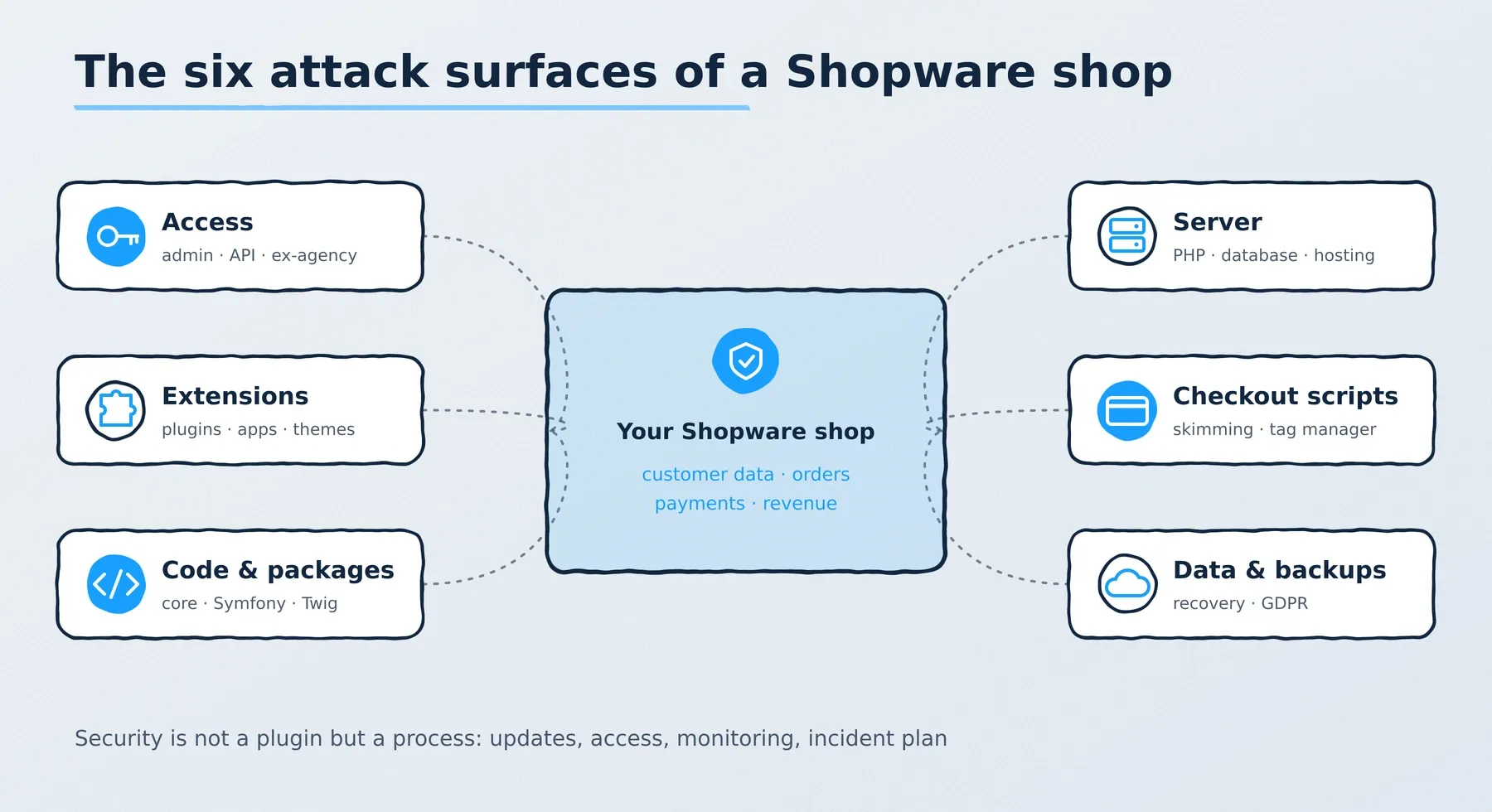
1. Access: the underestimated entry point
Many attacks need no vulnerability, only a valid password. Typical weak spots in grown shops:
Administrator accounts of former employees, freelancers or agencies that were never deleted
Integrations with full rights whose API keys sit in old scripts, spreadsheets or emails
Shared accounts such as "admin" or "agency" where nobody knows who is using them
SSH, hosting and database access held by the service provider and never changed
Shopware comes with protection mechanisms: roles and permissions via the access control list, rate limiters against password guessing for admin login, customer login and password reset, and the termination of all sessions as soon as a password is changed. Shopware does not ship built-in two-factor login for the administration by default; the request is listed in the official feedback portal. It can be added via extensions with one-time codes, security keys or passkeys, or via login through an identity provider.
A detail hardly anyone knows: according to Shopware, users allowed to edit mail templates, SEO URL templates or product export templates gain access to the underlying template language Twig. These permissions should only go to people you would also give technical access.
Switching agencies is especially critical: the previous agency usually has administrator, server and repository access. If this access remains after the switch, a third party still has full access to customer data and payment flows. How the handover works properly is covered in the articles Shopware agency won't hand over access and Transfer Shopware account and licences.
2. Extensions: code that runs in the shop
Every plugin is code that runs with all of the shop's rights. In its security recommendations, Shopware describes an attack path many merchants are not aware of: anyone who takes over an account with the right to install extensions can use it to place their own PHP code on the server and thus control the entire shop.
Shopware therefore recommends switching off extension management in the production shop and deploying plugins exclusively via Composer and a separate build and deployment process. Since Shopware 6.6.4.0 the Extension Manager can be set to read-only with the setting `runtime_extension_management: false`. On PaaS Native this is already the default. Side effect: new plugins and plugin updates must go through the staging system and are tested before they reach the shop.
Further risks with extensions: plugins no longer maintained by their vendor, plugins from unknown sources and changes an agency made directly in plugin code. More on this in the article Shopware Store & plugins.
3. Code and packages: Shopware, Symfony, Twig
Shopware publishes vulnerabilities as security advisories on GitHub. The basic rule according to the documentation: run a Shopware version that still receives security updates, and apply security updates promptly.
The most important tool for this is the Shopware 6 Security Plugin. It brings security fixes into existing installations without requiring a complete Shopware update straight away. Shopware recommends keeping it installed, active and up to date on self-hosted and PaaS shops at all times, even when Shopware itself is fully up to date. According to the documentation, the plugin versions for Shopware 6.5, 6.6 and 6.7 are maintained, the version for 6.4 no longer.
Three misunderstandings we see regularly:
How an update is planned and tested is covered in the article Shopware 6 update.
4. Server and infrastructure
With self-operated servers, operating system, PHP, database, web server, search, cache and queue belong on supported versions. Shopware now recommends PHP 8.4 or later, because its database drivers make certain SQL injection techniques additionally harder.
Lesser-known points from Shopware's security reference:
Uploaded HTML and SVG files can execute scripts when opened directly in the browser. Shopware recommends a dedicated content security policy header for such files, including on CDN and cache. The supplied configurations for Apache, Nginx and Caddy contain it, older server configurations often do not.
Media upload by URL: the shop server downloads files from external addresses. Shopware validates the addresses by default, and the feature can be switched off entirely.
Administration and API do not need to be reachable from the entire internet. Restricting them to known addresses via firewall or web server takes away a lot of surface from attackers.
5. Checkout and scripts: skimming
In so-called skimming, malicious code is injected into a shop's pages that reads payment or customer data in the browser and sends it to third parties. The shop works normally, customers notice nothing.
Entry points are not only vulnerabilities. Every script running on checkout pages can become a risk: tracking, chat, reviews, A/B tests. And anyone with access to a tag manager can deliver scripts on every page, including the checkout. In security terms, tag manager access is almost as powerful as server access.
The card standard PCI DSS has responded. Requirements 6.4.3 and 11.6.1 call for control of all scripts on payment pages and detection of tampering, and have applied since 31 March 2025. For merchants who fully outsource payments to a payment service provider and use the SAQ A questionnaire, the two requirements were removed in January 2025, but a new criterion was added: the merchant must confirm that its website is not susceptible to script attacks that could affect payment processing. With embedded payment forms this is not automatically met.
What helps:
What else can go wrong unnoticed in checkout is covered in the article Checkout & payment errors.
6. Data and backups
A backup is only worth as much as its restore. In its incident response guide, Shopware points out something that gets lost in the rush: an attack may have started long before it was noticed. You therefore restore a verified backup from before the earliest suspected compromise. Anyone who keeps only seven days of backups and notices the attack after three weeks no longer has a clean backup. More on this in the article Shopware staging and backup.
The emergency: what to do in which order
Shopware has published its own guide to responding to attacks. The key steps:
Contain: stop public access to the affected shop and isolate systems, together with the host via firewall or load balancer, including administration and APIs. According to Shopware, the maintenance page alone is not enough.
Preserve evidence: save logs and snapshots before deleting files, restarting services or restoring backups. Record times and actions.
Find the entry point: how and when did the attacker get in, what rights did they have, what did they do? Search specifically for back doors, modified plugins, scheduled tasks, additional administrators and new integrations.
Rebuild instead of cleaning: if code execution is suspected, Shopware says the entire system must be considered compromised. Deleting visible back doors is not enough. The safe route is a rebuild from trusted sources and a verified backup from before the attack.
Rotate credentials: reset administrator and integration access, database passwords, app secrets, hosting access and keys for external services, and end all sessions.
Check legal obligations: if personal data is affected, a data breach under the GDPR generally has to be reported to the supervisory authority within 72 hours. Shopware advises seeking legal advice early and not waiting until recovery is complete.
Shopware offers dedicated support for security incidents, according to the documentation also for shops on the Community Edition without a support contract.
Silent errors: how to recognise an attack
The most dangerous attacks are the quiet ones. Warning signs nobody looks for in daily operations:
At arboro we call such deviations silent errors. arboro.PULSE monitors availability, load time, test purchases through to checkout, payment methods and purchasing behaviour. If a payment method collapses or the checkout behaves differently than usual, it shows before the payment provider reports it.
Security check for managing directors
Twelve questions every management team should ask its service provider:
How we do it at arboro
When taking over a shop, we analyse, log and map everything, including access, integrations, plugins and server configuration. Access held by former service providers is closed and credentials are rotated. The Security Plugin is standard for us, security updates are prioritised and tested on the staging system before they go live. How often a shop is updated regularly is the merchant's decision. We advise, you decide. And with arboro.PULSE we take responsibility for ongoing operations so that silent errors show up before they become expensive.
For ongoing responsibility with SLA and arboro.PULSE: Shopware & Shopify support. For an orderly switch including access handover: Agency switch. For server-side tracking and fewer scripts in the browser: Shopware & Shopify development.
Sources

Frequently asked questions
Shopware comes with protection mechanisms such as roles and permissions, rate limiters, content security policy and a Security Plugin, and publishes vulnerabilities as security advisories. How secure a shop is depends mainly on updates, access, plugins and server.
An official Shopware plugin that brings security fixes into existing installations without an immediate full update. It does not replace updates and does not cover vulnerabilities in third-party libraries such as Symfony or Twig.
Not by default. It can be added via extensions with one-time codes, security keys or passkeys, or via login through an identity provider.
Because every plugin runs with all of the shop's rights. Anyone who takes over an account with installation rights can put their own code on the server. Shopware therefore recommends deploying plugins only via Composer and deployments.
Injected code that reads payment or customer data in the browser. The shop keeps working normally. Protection comes from a content security policy, few scripts on checkout pages and clear rights in the tag manager.
Stop access and isolate systems, preserve evidence, find the entry point, rebuild instead of cleaning if code was executed, rotate all credentials and check legal reporting obligations. Under the GDPR a 72-hour deadline usually applies.
Do you know who has access to your shop today?
Access, plugins, updates and checkout reviewed, gaps closed and operations monitored with arboro.PULSE. With an SLA and clear responsibility.