robots.txt for Shopware and Shopify in the AI era: visible in AI answers without losing control
“Should we block GPTBot?” Store owners hear this question from their team, their agency or their own gut feeling. The honest answer: it’s the wrong question. GPTBot is just one of three crawlers OpenAI operates, and of all of them, it has the least to do with your visibility in ChatGPT.
In practice, we see both mistakes. Stores that block all AI crawlers out of caution and then no longer appear in any AI answer. And stores whose robots.txt is built in a way that lets AI crawlers search exactly the areas that have long been blocked for Google. This article shows what robots.txt really controls, which AI crawlers exist and what a clean configuration looks like for Shopware 6, Shopware 5 and Shopify.

What robots.txt can and can’t do
The robots.txt is a text file in the root directory of your store, for example at www.your-store.com/robots.txt. Reputable crawlers read it before fetching pages and follow its rules. It specifies which areas a crawler may fetch. Nothing more. What your store’s robots.txt currently looks like and whether it contains errors is shown in seconds by the free robots.txt Checker.
Three misconceptions persist:
robots.txt doesn’t prevent indexing. A blocked page can still appear in Google if other pages link to it. If you want to keep a page out of the search results, you need a noindex, and for that the page must not be blocked.
robots.txt protects nothing. It is a request, not a lock. Whatever is publicly accessible stays publicly accessible. Sensitive data belongs behind a login.
robots.txt doesn’t work retroactively. What a model has already collected for training cannot be retrieved by a new rule.
Three types of AI crawlers
The major providers now separate their crawlers by task. This very distinction determines what a block achieves:
Training crawlers collect content used to train future language models. Blocking them means your content won’t flow into new models. This has no direct bearing on visibility in AI search.
Search crawlers build the index from which AI search draws its answers and sources. Block them, and you disappear from the answers.
User-triggered fetches happen when a person asks a question in the chat and the assistant opens a page live to answer it. Because a person triggers the fetch, some providers don’t treat these requests like classic crawling and don’t always apply robots.txt to them.
Provider | Training | Search | User fetch |
OpenAI (ChatGPT) | GPTBot | OAI-SearchBot | ChatGPT-User |
Anthropic (Claude) | ClaudeBot | Claude-SearchBot | Claude-User |
Perplexity | – | PerplexityBot | Perplexity-User |
Google (Gemini, AI Overviews) | Google-Extended | Googlebot | – |
Microsoft (Copilot) | – | Bingbot | – |
Apple | Applebot-Extended | Applebot | – |
Common Crawl | CCBot | – | – |
Meta | Meta-ExternalAgent | – | Meta-ExternalFetcher |
Two details matter for merchants. Google-Extended is not a crawler of its own but a control token: it determines whether your content may be used for Gemini, but changes nothing about Google Search and AI Overviews, which run via the normal Googlebot. And CCBot from Common Crawl collects a freely available dataset used to train many language models. If you don’t want training at all, you should block it too.
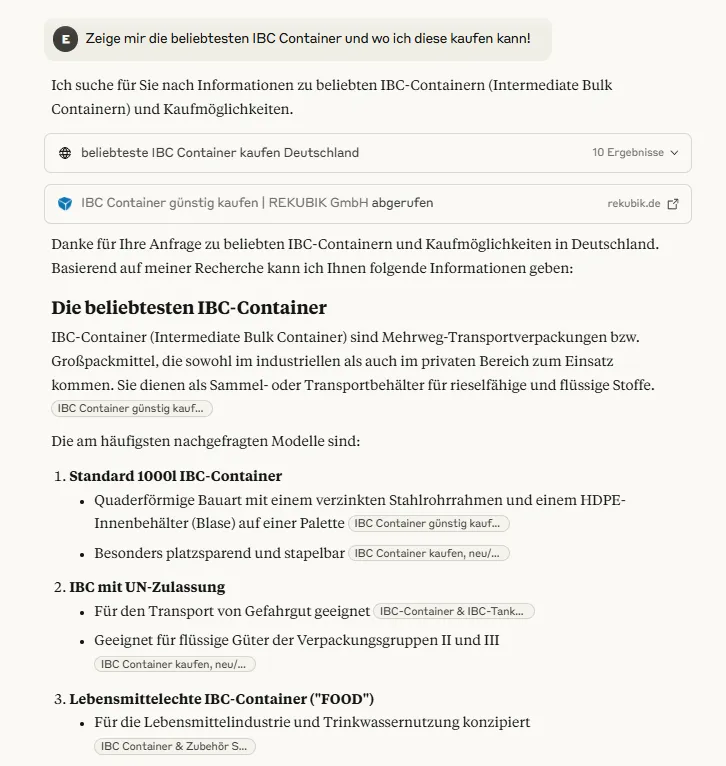
A user-triggered fetch in practice: Claude opens a store’s product page while answering and builds the information directly into its answer (screenshot, May 2025).
What’s at stake
AI assistants now answer buying questions with concrete products: name, image, price, availability and a link to the store. The data for this comes from your product pages, structured data, price and shipping information and freely accessible product images. Whatever a search crawler isn’t allowed to fetch can’t appear in these answers.
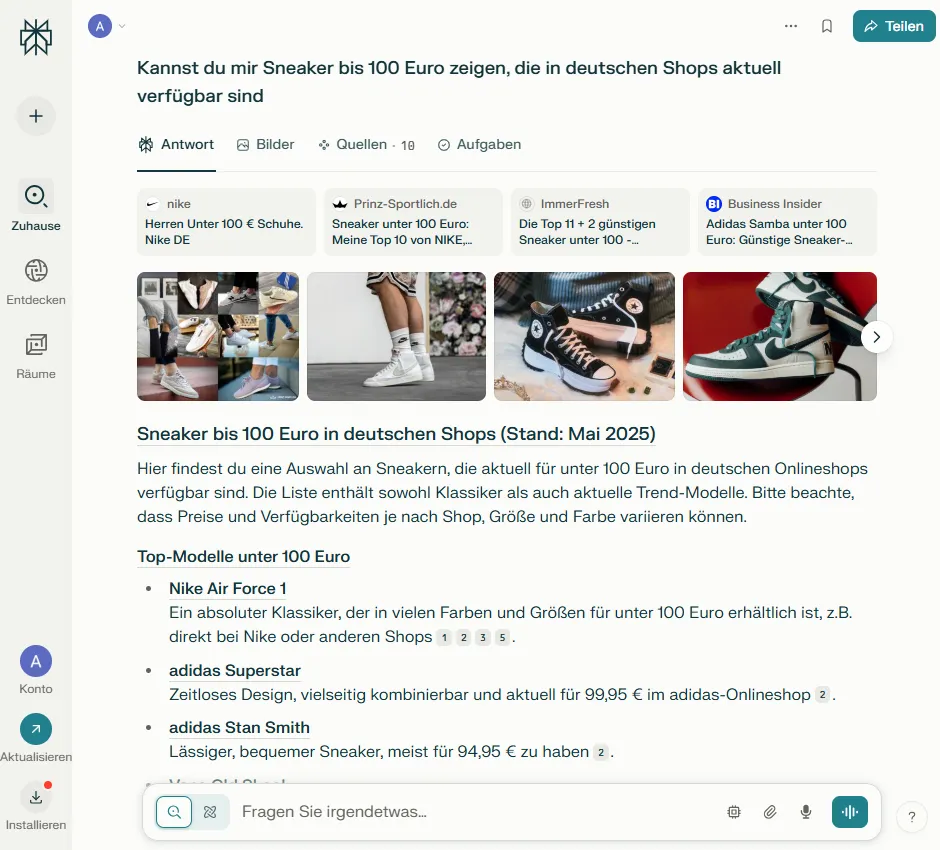
A buying question in Perplexity: the answer names models, prices and stores and links directly to them (screenshot, May 2025).
The decision: search yes, training your choice
For the vast majority of online stores, the matter is clear: search crawlers and user-triggered fetches should be allowed. Blocking them means voluntarily giving up a sales channel in which buying decisions are made before a customer even opens a search engine.
For training, there are good reasons for both routes. In favour: future models will know your brand, your range and your expertise and can name you even without live search. Against: you may not want to provide content such as your own guides or product copy free of charge for other companies’ models. In Germany, a machine-readable reservation of rights, for example via robots.txt, is also considered one way to object to use for text and data mining (Section 44b of the German Copyright Act). There is no obligation to decide either way; what matters is that the decision is made deliberately.
The most common trap: groups in robots.txt
A robots.txt consists of groups. Each group starts with one or more User-agent lines and contains the rules for exactly those crawlers. The User-agent: * group applies to all crawlers that are not named.
And here is the trap: as soon as a crawler gets its own group, it ignores the general group completely. Many guides recommend “specifically allowing” AI crawlers with their own group, like this:
User-agent: GPTBot
Disallow: /checkout/
Allow: /
This now lets GPTBot crawl everything not explicitly listed in its group: internal search, filter combinations, wishlists and everything else that was blocked under User-agent: *.
The clean solution is simpler. All the rules for your store go into the general group, and they automatically apply to every crawler, including the AI providers’ search crawlers. Only the crawlers you want to block completely get their own groups:
# Do not allow training by AI models (optional)
User-agent: GPTBot
User-agent: ClaudeBot
User-agent: Google-Extended
User-agent: Applebot-Extended
User-agent: CCBot
User-agent: Meta-ExternalAgent
Disallow: /
If you want to allow training, simply leave this block out.
Template for Shopware 6
This template covers the typical areas crawlers don’t need and keeps filter and sorting variants out of crawling. The category page numbers (?p=) are deliberately left open so that Google finds all products.
User-agent: *
Disallow: /account
Disallow: /checkout
Disallow: /wishlist
Disallow: /search
Disallow: /suggest
Disallow: /widgets
Disallow: /admin
Disallow: /api
Disallow: /store-api
Disallow: /*?*order=
Disallow: /*?*properties=
Disallow: /*?*manufacturer=
Disallow: /*?*min-price=
Disallow: /*?*max-price=
Disallow: /*?*rating=
Disallow: /*?*shipping-free=
Sitemap: https://www.your-store.com/sitemap.xml
Three practical notes. Rules are prefixes: Disallow: /account also blocks a category whose URL starts with /account. So check your category URLs before using the template. If your store uses language prefixes such as /en/ or /fr/, the rules need a variant with a leading wildcard, for example Disallow: /*/checkout. And directories for images, thumbnails, CSS and JavaScript such as /media/, /thumbnail/, /theme/ and /bundles/ must never be blocked, otherwise Google sees a broken page.
Template for Shopware 5
Shopware 5 has no longer received updates from the manufacturer since mid-2024. As long as the store is running, it should still be properly controlled:
User-agent: *
Disallow: /checkout/
Disallow: /account/
Disallow: /register/
Disallow: /note/
Disallow: /compare/
Disallow: /ticket/
Disallow: /backend/
Disallow: /recovery/
Disallow: /search
Disallow: /widgets/checkout/
Disallow: /widgets/compare/
Disallow: /widgets/notes/
Disallow: /*?o=
Disallow: /*&o=
Disallow: /*?n=
Disallow: /*&n=
Disallow: /*?f=
Disallow: /*&f=
Disallow: /*?min=
Disallow: /*&min=
Disallow: /*?max=
Disallow: /*&max=
Sitemap: https://www.your-store.com/sitemap.xml
Important: in Shopware 5, the storefront loads shopping worlds and listings via /widgets/. So block only the subdirectories listed, never /widgets/ entirely. If you are planning the switch, you will find the options on the page about migrating from Shopware 5.
Shopify: robots.txt.liquid
Shopify delivers a robots.txt with sensible default rules for every store. Cart, checkout, customer account, internal search and sorting variants of collections are already blocked. It can be changed via the robots.txt.liquid template in the theme. Never replace the whole file, but add to the default rules. That way, future adjustments by Shopify remain effective too:
{%- for group in robots.default_groups -%}
{{- group.user_agent }}
{%- for rule in group.rules -%}
{{ rule }}
{%- endfor -%}
{%- if group.sitemap != blank -%}
{{ group.sitemap }}
{%- endif -%}
{%- endfor %}
User-agent: GPTBot
User-agent: ClaudeBot
User-agent: Google-Extended
User-agent: CCBot
Disallow: /
The second part is again optional and only needed if you want to exclude training. More on the platform’s specifics under Shopify SEO.
Checking and monitoring
A robots.txt is quickly written and quickly wrong. That’s why three checks belong after every change. The robots.txt report in Google Search Console shows which version Google has read and whether there are errors. URL inspection shows for individual pages whether they may be fetched. And server logs show, unfiltered, which crawlers actually come and which URLs they fetch.
One point is often overlooked: firewalls, CDNs and bot protection at hosting providers sometimes block AI crawlers by default, regardless of your robots.txt. So check there too whether search crawlers such as OAI-SearchBot, Claude-SearchBot and PerplexityBot are let through. Whether a request really comes from the stated provider can be checked against the providers’ published IP ranges, because many bots merely pretend to be well-known crawlers.
What you can’t solve with robots.txt
For some problems, robots.txt is the wrong tool. Outdated prices or delivery times in AI answers are not caused by too much crawling, but by data that is fetched too rarely or is contradictory. Up-to-date structured data on the product page and a well-maintained product feed help more here than any block. Against server load from aggressive bots, rate limiting on the server or in the CDN helps. The Crawl-delay directive in robots.txt is ignored by Google and not officially supported by most AI providers. And content nobody should see belongs behind a login, not on a list of prohibitions.
Whether your store is technically readable for AI assistants and AI agents is shown by the free Agentic Commerce Scanner. How to become visible in AI answers in a targeted way is described on GEO for online stores. For Shopware stores, you will find the technical foundations under Shopware SEO.
Have your robots.txt checked
Want to know whether your robots.txt accidentally locks out search crawlers or allows AI crawlers more than Google? The arboro team checks the configuration of your Shopware or Shopify store, compares it with server logs and Search Console and implements the corrections directly.
Crawler information as of November 2026. Providers adjust their crawlers regularly.