
Structured Data in Shopware and Shopify: What SEO and GEO Really Need
In short: Structured data (Schema.org, ideally as JSON-LD) describes products, prices, availability, brand and merchant in a way machines can read without interpretation. For Google, it makes products eligible for rich results and, together with the Merchant Center feed, for merchant listings. Consistency between page, markup and product feed helps AI assistants such as ChatGPT, Claude, Gemini and Perplexity classify products correctly. Whether a shop gets mentioned, however, depends on further factors that differ by platform. Neither Shopware 6 nor Shopify delivers complete markup out of the box.
What structured data does and doesn't do
Structured data is not a direct ranking factor. It makes content unambiguous and makes a page eligible for certain search features: product snippets with star ratings, merchant listings with price, shipping costs and return policies, breadcrumbs and the site name in search results. Product data reaches Google via markup, via the Merchant Center feed or both. According to its product snippet documentation, Google recommends both.
Some of these features no longer exist. Google removed HowTo results in 2023, first limited FAQ rich results to government and health websites and dropped them entirely on 7 May 2026. The FAQ report and test are also disappearing from Search Console and the Rich Results Test. As a machine-readable question-and-answer structure, FAQ markup is still useful, for Bing and for AI systems.
You'll find the basics and key terms in our glossary entry on structured data. This article goes deeper.
The consistency triangle
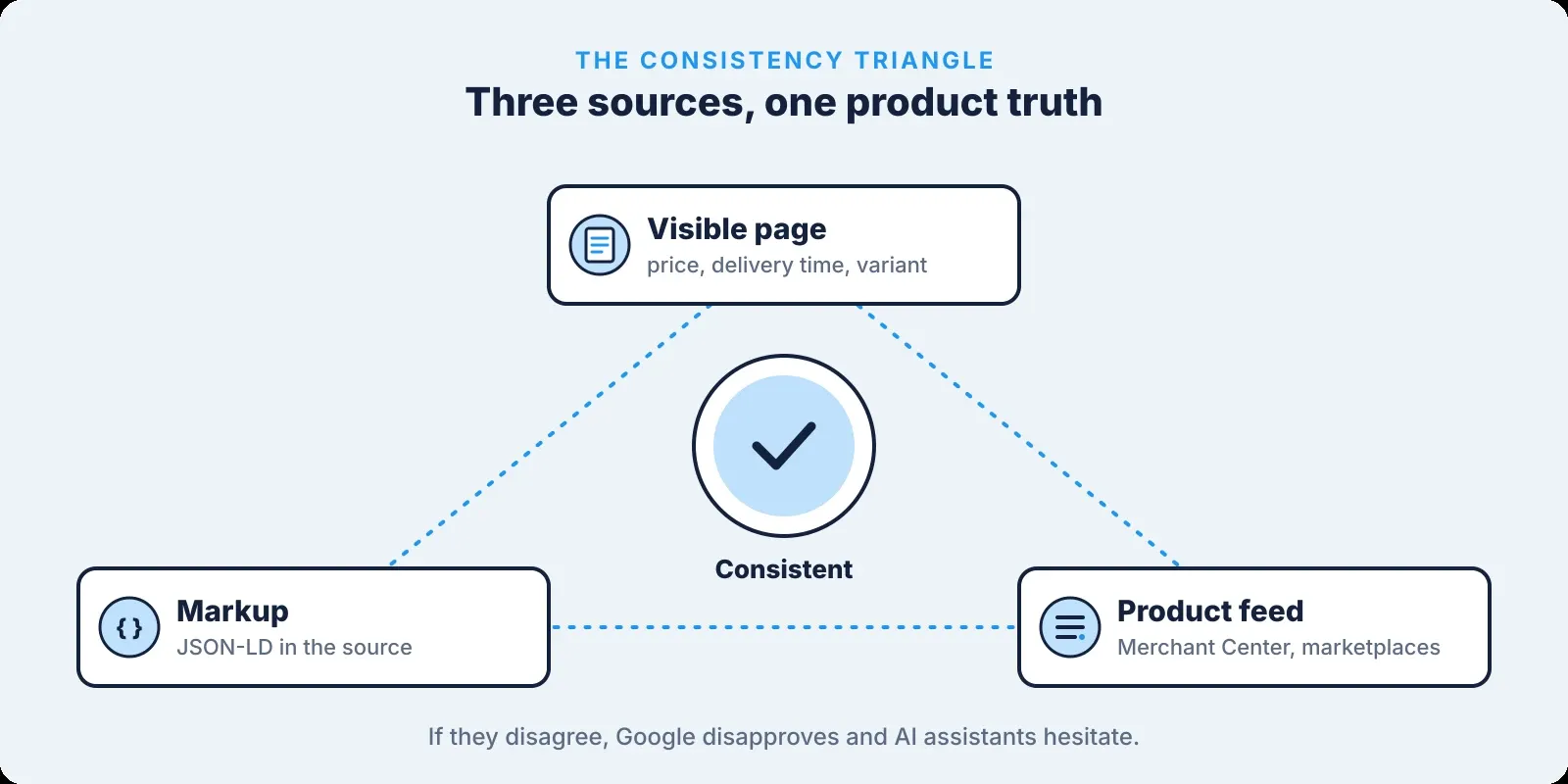
The graphic shows the principle: price, delivery time and variant must be identical on the visible page, in the JSON-LD and in the product feed.
Every shop has at least three sources for the same product truth:
The visible page: price, delivery time, variant and reviews as the customer sees them.
The markup: JSON-LD or Microdata in the source code.
The feed: Merchant Center, price comparison sites, marketplaces and, increasingly, agent interfaces.
When these sources contradict each other, Merchant Center is usually the first place it shows. Disapprovals for price or availability mismatches often trace back to outdated or incorrectly mapped markup, but also to delayed feed updates or caching. Structured data is therefore less a visibility tool than a litmus test for your data quality.
Why structured data matters for GEO
Generative Engine Optimization (GEO) aims to get your shop mentioned and recommended in AI answers. For product queries, data reaches these systems by three routes: search indexes and product graphs, such as Google's Shopping Graph behind AI Overviews and AI Mode, their own crawling of your pages, and direct connections from shop platforms. Since March 2026, for example, Shopify has been sending product data via Shopify Catalog and Agentic Storefronts directly to ChatGPT, Microsoft Copilot, AI Mode and Gemini.
Google stresses that AI Overviews and AI Mode require no special schema.org markup. Structured data is therefore not an entry ticket. It does help on every route, though: a model doesn't have to guess whether "from €49.90" is the price of the default variant or a tiered price if the markup states it clearly. Unambiguous data reduces the risk that an assistant quotes the wrong price.
Three points usually missing from GEO discussions
Deliver it server-side. As far as we know today, many AI crawlers don't execute JavaScript. Markup injected via Tag Manager or a client-side app script is visible to Google after rendering, but many other crawlers never see it.
Let the crawlers in. The best markup is useless if your robots.txt blocks the relevant bots. For background, see our article on robots.txt in the age of AI.
Agents need complete information. Agentic shopping features compare offers using details such as GTIN, total price including shipping, delivery time and return conditions. These are exactly the fields many shops are missing. How this ties in with the Universal Commerce Protocol and agentic commerce is covered in that article.
Shopware 6: from Microdata to JSON-LD
Up to version 6.7.8, the standard Shopware 6 storefront marks up product data as Microdata, i.e. as itemprop attributes directly in the Twig templates, for example in the buy widget and the breadcrumb. With version 6.7.9 (release news April 2026), Shopware switched the output to JSON-LD in the <head>, for now behind the feature flag JSON_LD_DATA, which is off by default. With the flag on, Shopware outputs WebSite with SearchAction, Organization with logo, the matching WebPage type, BreadcrumbList, ItemList on category and search pages and a much richer Product, including all images, reviews, dimensions, gtin13, mpn, a seller on the offer and delivery time. The Microdata is then removed completely. With Shopware 6.8 it will be dropped altogether.
That is a big step forward. On variant pages, Shopware now outputs a ProductGroup with the current variant in hasVariant. A look at the 6.7.9 product template also shows the gaps, though: variesBy, i.e. what the variants differ in, return policies and the unit price are missing. Shipping details consist of delivery time only, without shipping costs or destination country. If you have extended your templates with itemprop, you need to move those changes to the new JSON-LD blocks before switching.
Typical weak spots in Shopware
Theme overrides: As long as Microdata is active, the markup is tied to the HTML. When a theme overrides a block such as the buy widget,
itempropattributes often disappear unnoticed. With JSON-LD, the data sits in separate template blocks, which also need checking when you switch.Duplicate entities: An SEO plugin adds its own JSON-LD while Shopware outputs Microdata or, from 6.7.9, its own JSON-LD. Google then sees two Product entities, in the worst case with different prices. Before you turn on the feature flag at the latest, decide which source delivers the markup.
Variants: Shopware gives variants their own URLs and product numbers. With Microdata, the link is missing completely. With JSON-LD from 6.7.9 you get a
ProductGroup, but withoutvariesBy. Google then knows the variants belong together, but not whether they differ in colour, size or material.Net vs. gross: In B2B customer groups with net price display, net prices end up in the markup, while Merchant Center expects prices including VAT for Germany.
Manufacturer: The manufacturer field becomes the
brand. If it contains the supplier rather than the brand, the entity is wrong.Delivery time and clearance: Clearance sales, stock levels and delivery times must be mapped correctly to
InStock,OutOfStock,BackOrderorPreOrder.
In our experience, Shopware has the edge here: templates, plugins and the data model can be fully controlled. Learn more about the platform under Shopware SEO.
Enabling JSON-LD in Shopware
Shopware ships the feature flag JSON_LD_DATA itself, you only need to enable it. The environment variable works from 6.7.9, the console command only from 6.7.16:
# Option 1: environment variable in .env.local
JSON_LD_DATA=1

# Option 2, only from 6.7.16: via console, the state is stored in the database
bin/console feature:enable JSON_LD_DATA

# Check the status
bin/console feature:list
Name without prefix: The variable is called
JSON_LD_DATA, notFEATURE_JSON_LD_DATA. Shopware checks the flag name directly, as the source code of the Feature class shows.Console command only from 6.7.16: Up to 6.7.15,
feature:enabledoes store the state, but Shopware discards stored flags withmajor: trueon the next load, and that is exactly howJSON_LD_DATAis defined there. This is shown by comparing theFeatureFlagRegistryin 6.7.9 and 6.7.16.The environment variable takes precedence: If
JSON_LD_DATAis set in the environment, that value applies, even if something else is stored in the database. The console command clears the cache itself; after changing.env.localyou need to clear the cache.Pitfall from Shopware 6.7.16: Older guides define the flag themselves, for example in a
shopware.yamlwithmajor: trueorfalse. Since 6.7.16,majorexpects a version number such asv6.8.0.0, and such blocks make the update fail. Delete your own definitions, as also described in the Shopware forum.Staging first: With the flag on, the Microdata disappears immediately. Check and switch off plugins that output their own markup first, otherwise there will be two product entities in the source code.
Closing the gaps in Shopware's new JSON-LD with Twig
The new output can be extended via Twig blocks. Each schema has one block that builds the data and an inner block ending in _script that outputs it. In the inner block you add your data and then call the original output with {{ parent() }}. Three examples for your own theme or plugin:
Return policy once at Organization level: Google applies a return policy defined on the Organization to all products. That saves maintenance at product level.
{% sw_extends '@Storefront/storefront/layout/structured-data/json-ld-organization.html.twig' %}

{% block layout_structured_data_organization_script %}
    {% set orgData = orgData|merge({
        hasMerchantReturnPolicy: {
            '@type': 'MerchantReturnPolicy',
            applicableCountry: ['DE', 'AT'],
            returnPolicyCategory: 'https://schema.org/MerchantReturnFiniteReturnWindow',
            merchantReturnDays: 30,
            returnMethod: 'https://schema.org/ReturnByMail',
            returnFees: 'https://schema.org/FreeReturn'
        }
    }) %}
    {{ parent() }}
{% endblock %}
variesBy for variant pages: So that Google knows what the variants differ in, add the properties that actually vary in your store. The example only names the attributes. It is complete only when each variant carries its own values, such as color and size on the variant's product. Shopware does not output these by default.
{% sw_extends '@Storefront/storefront/layout/structured-data/json-ld-product.html.twig' %}

{% block page_product_detail_json_ld_script %}
    {% if productData['@type'] == 'ProductGroup' %}
        {% set productData = productData|merge({
            variesBy: ['https://schema.org/color', 'https://schema.org/size']
        }) %}
    {% endif %}
    {{ parent() }}
{% endblock %}
Unit price as UnitPriceSpecification: Shopware knows the content and base unit from the product data, but does not output them in the JSON-LD. This snippet adds the unit price to the offer, for simple products and variants. Important: if the price is also in offers.price, Google uses that and ignores the priceSpecification. The snippet therefore removes offers.price and outputs the price only in the UnitPriceSpecification, as in the example in Google's documentation. The unit is translated into the UN/CEFACT code that Schema.org expects.
{% sw_extends '@Storefront/storefront/layout/structured-data/json-ld-product.html.twig' %}

{% block page_product_detail_json_ld_script %}
    {% set price = page.product.calculatedPrices|length == 1 ? page.product.calculatedPrices.first : page.product.calculatedPrice %}
    {% set unit = page.product.unit %}
    {% if price.referencePrice and unit and page.product.calculatedPrices|length <= 1 %}
        {% set codes = { 'kg': 'KGM', 'g': 'GRM', 'l': 'LTR', 'ml': 'MLT', 'm': 'MTR', 'm²': 'MTK' } %}
        {% set code = codes[unit.translated.shortCode|lower] ?? unit.translated.shortCode %}
        {% set unitPrice = {
            '@type': 'UnitPriceSpecification',
            price: price.unitPrice,
            priceCurrency: context.currency.isoCode,
            referenceQuantity: {
                '@type': 'QuantitativeValue',
                value: page.product.purchaseUnit,
                unitCode: code,
                valueReference: {
                    '@type': 'QuantitativeValue',
                    value: page.product.referenceUnit,
                    unitCode: code
                }
            }
        } %}
        {% if productData['@type'] == 'ProductGroup' %}
            {% set variants = [] %}
            {% for item in productData.hasVariant %}
                {% if item.sku == page.product.productNumber %}
                    {% set item = item|merge({ offers: item.offers|filter((v, k) => k != 'price')|merge({ priceSpecification: unitPrice }) }) %}
                {% endif %}
                {% set variants = variants|merge([item]) %}
            {% endfor %}
            {% set productData = productData|merge({ hasVariant: variants }) %}
        {% else %}
            {% set productData = productData|merge({ offers: productData.offers|filter((v, k) => k != 'price')|merge({ priceSpecification: unitPrice }) }) %}
        {% endif %}
    {% endif %}
    {{ parent() }}
{% endblock %}
If you use variesBy and the unit price together, both belong in the same page_product_detail_json_ld_script block in one file. Values such as the return window, countries, variant attributes and units must match your store and your Merchant Center settings. The examples are based on the Shopware 6.7.9 source code. Test them on a staging system with the feature flag enabled and check the result with the Rich Results Test and the Search Console reports.
Shopify: JSON-LD via Liquid filter
Current Shopify themes generate product markup via the Liquid filter structured_data. It outputs JSON-LD and, since July 2024, represents products with variants as a ProductGroup. The output includes name, description, images, the vendor as brand, SKU, GTIN from the barcode field and an offer per variant. Reviews, shipping costs and return policies are missing by default and have to be added. Which fields a store actually outputs depends on the theme and the data maintained, so always check the source code of a real product page.
Typical weak spots in Shopify
Vendor is not brand: Shopify uses the vendor as the brand. In many shops, that field contains the supplier or the shop name.
App duplicates: SEO, review and feed apps write their own JSON-LD. Three Product blocks on one page are not unusual.
"Continue selling when out of stock": This inventory setting often results in
InStock, whenBackOrderwould be correct.Markets and currency: Every market URL must deliver the price and
priceCurrencyof that market. Automatic IP-based redirects can lead crawlers to see the wrong currency.GTIN: The filter takes the GTIN from the variant's barcode field. If that field is empty or filled with internal numbers, one of the most important identifiers for comparisons and agents is missing or wrong.
Shipping and returns: This information often lives only in Merchant Center, not in the markup. It then remains invisible to crawlers outside Google.
Direct data route: Via Shopify Catalog and Agentic Storefronts, product data reaches AI assistants without crawling. Errors in barcode, vendor or variants end up there just the same. The catalog does not replace markup for other crawlers.
Closing the gaps in Shopify with Liquid
You cannot extend the structured_data filter itself. What you can extend is the Organization block that Dawn and many other themes output in sections/header.liquid. Google treats a return policy on the Organization as the default for all products. Product-specific policies in the product markup take precedence. The example also adds a stable @id and filters out empty social media links. The Dawn demo outputs several empty entries in sameAs.
{%- comment -%} sections/header.liquid: replace the existing Organization block {%- endcomment -%}
{%- capture social -%}{{ settings.social_facebook_link }}|{{ settings.social_instagram_link }}|{{ settings.social_youtube_link }}|{{ settings.social_tiktok_link }}|{{ settings.social_pinterest_link }}|{{ settings.social_twitter_link }}{%- endcapture -%}
<script type="application/ld+json">
  {
    "@context": "https://schema.org",
    "@type": "Organization",
    "@id": {{ request.origin | append: '/#organization' | json }},
    "name": {{ shop.name | json }},
    "url": {{ request.origin | json }},
    {%- if settings.logo %}
    "logo": {{ settings.logo | image_url: width: 500 | prepend: 'https:' | json }},
    {%- endif %}
    "sameAs": [
      {%- assign first = true -%}
      {%- assign links = social | split: '|' -%}
      {%- for link in links -%}
        {%- if link != blank -%}
          {%- unless first -%},{%- endunless -%}{{ link | json }}
          {%- assign first = false -%}
        {%- endif -%}
      {%- endfor -%}
    ],
    "hasMerchantReturnPolicy": {
      "@type": "MerchantReturnPolicy",
      "applicableCountry": ["DE", "AT"],
      "returnPolicyCategory": "https://schema.org/MerchantReturnFiniteReturnWindow",
      "merchantReturnDays": 30,
      "returnMethod": "https://schema.org/ReturnByMail",
      "returnFees": "https://schema.org/FreeReturn"
    }
  }
</script>
Return window, countries and fees must match your return conditions and Merchant Center. Test the change in a copy of the theme before publishing it.
In our view, Shopify often creates extra work for SEO and GEO because theme, apps and platform logic are intertwined. Details under Shopify SEO.
Shopware vs. Shopify
Criterion | Shopware 6 | Shopify |
Default format | up to 6.7.8 Microdata, from 6.7.9 JSON-LD via feature flag, from 6.8 JSON-LD only | JSON-LD via |
Variants | from 6.7.9 ProductGroup with | ProductGroup in the filter, variants via parameter |
Gaps in the default |
| reviews, shipping, returns, GTIN only if barcode is maintained |
Most common source of problems | custom | duplicate apps, vendor as brand |
Control over output | full, via plugin and template | via theme code and metafields, limited by platform logic |
Multiple countries and currencies | via sales channels and domains | via Markets |
Verified: what both systems output by default
As of 25 November 2026. For Shopware, the basis is the 6.7.9.0 product template with the feature flag JSON_LD_DATA enabled. For Shopify, it is a product page of the official Dawn demo store, which uses the structured_data filter. Other themes, apps and the data you maintain can change the output. Because the demo page may change, we have saved the retrieved output as a dated copy (PDF).
Field | Shopware 6.7.9 | Shopify (Dawn) |
Variants |
|
|
| missing | missing |
| from the manufacturer | from the vendor |
| product number | variant SKU |
GTIN |
|
|
| manufacturer number | not output |
Price, currency, availability | yes | yes |
| Organization via | not output |
|
| not output |
| delivery time only | not output |
| missing | not output |
Unit price | missing | not output |
Reviews |
| not output |
Weight and dimensions | yes | not output |
Worth noting: in the Shopify demo store, only one of seven variants carries a GTIN, because only that one has a barcode. Shopware's output is considerably more complete, but for variants it only names the one currently viewed. Both lack return policies, variesBy and the unit price.
The properties with the biggest impact
Property | Impact on Google | Impact on AI and agents |
| unambiguous matching in the Shopping Graph | product identity across shops |
| required for merchant listings | accurate price comparison |
| display, disapprovals on mismatch | the agent's purchase decision |
| shipping costs and delivery time in the snippet | total cost comparison |
| returns in the snippet | trust and risk assessment |
| stars in the product snippet | quality signal in recommendations |
Return policies can also be defined once at Organization level instead of on every product. That reduces sources of error for large catalogues.
The @id graph: turning data fragments into an entity
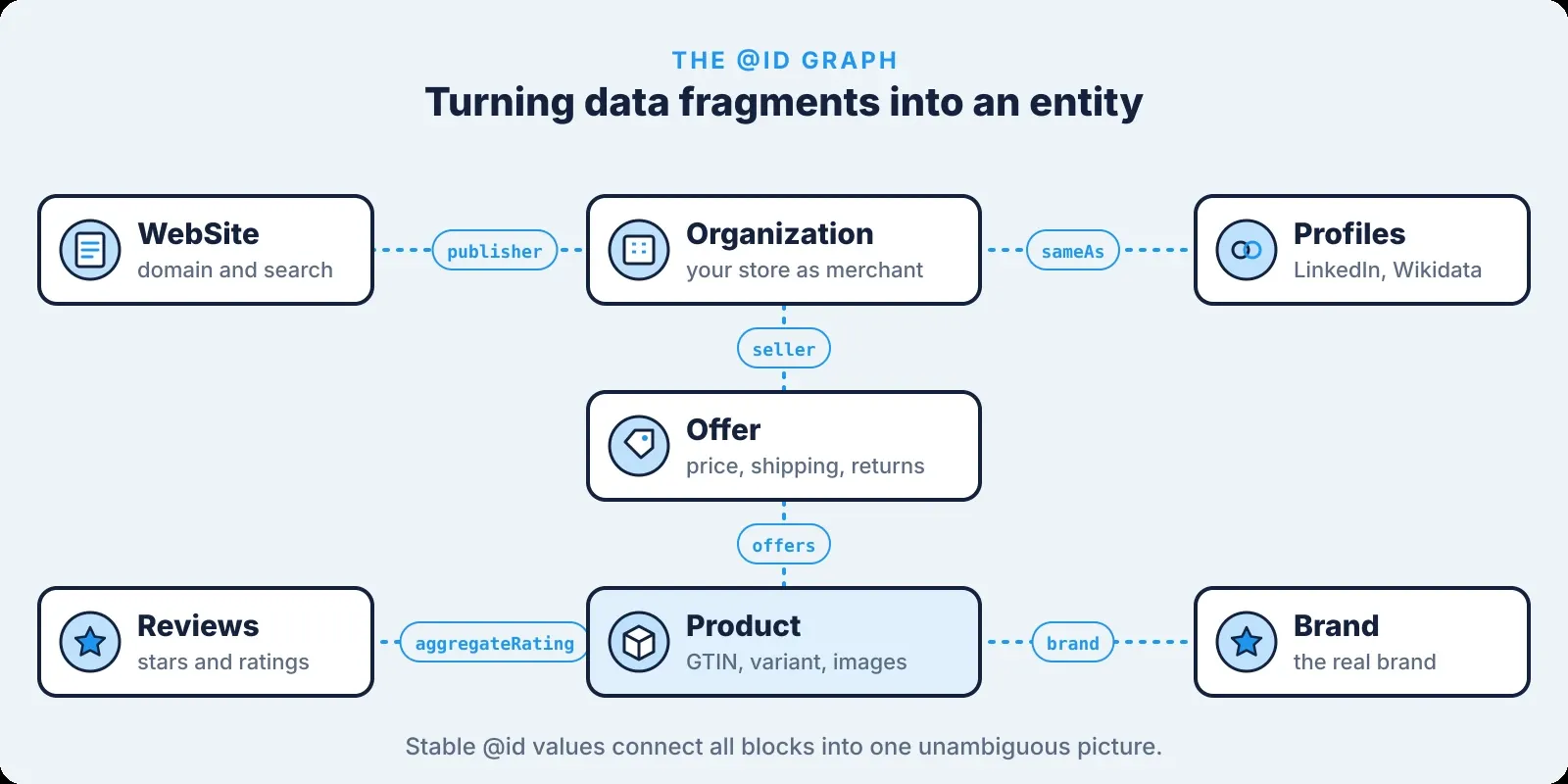
The graphic shows how stable @id values connect Organization, offer, product, brand, reviews and profiles into one connected graph.
The lever most shops leave unused: Organization, WebSite, brand and products sit side by side as isolated blocks. Stable @id values connect them into a graph. The offer references the merchant, the product references the brand, and the Organization points to your profiles via sameAs.
{
  "@context": "https://schema.org",
  "@graph": [
    {"@type": "Organization", "@id": "https://www.example-shop.com/#organization", "name": "Example Ltd"},
    {"@type": "Product", "@id": "https://www.example-shop.com/product-a#product", "name": "Product A",
     "offers": {"@type": "Offer", "price": "49.90", "priceCurrency": "EUR",
                "seller": {"@id": "https://www.example-shop.com/#organization"}}}
  ]
}
This gives AI systems a consistent picture: who sells, which brand, under which conditions. That is exactly the foundation for GEO for online shops and for entity SEO.
Specifics for Germany, Austria and Switzerland
Unit price: For goods offered to consumers by weight, volume, length or area, the German Price Indication Ordinance (PAngV) requires a unit price, with some exceptions. In the markup, it belongs in a
UnitPriceSpecificationwith a reference quantity, as Google describes for merchant listings.Strikethrough prices: A strikethrough price in the markup must match the legally correct reference price. Markup that shows an outdated RRP as the strikethrough price is both a legal and a data problem.
Switzerland: If you sell from Germany to Switzerland, you need separate shipping and return details with destination country CH. CHF prices are not mandatory for Google, as Merchant Center can show EUR prices via currency conversion. What matters is that feed, landing page and checkout show the same currency. For Swiss customers, CHF prices are still the better choice.
Austria: Separate shipping details for AT are required if costs or delivery times differ.
A five-step approach
Audit: Check all page types (product, variant, category, home page, brand) with the Rich Results Test and the Schema Markup Validator. The Rich Results Test only shows types that Google supports.
Define a single source: Set one single output point: a custom plugin in Shopware, a theme snippet in Shopify. Switch off duplicate output from apps and plugins.
Data mapping: Pull brand, GTIN, availability, gross and net prices, unit price, and shipping and returns from the correct fields.
Align with the feed: Feed markup and Merchant Center feed from the same data source.
Monitoring: Check the merchant listings and product snippets reports in Search Console after every theme, plugin or app update.
Common mistakes
Marking up content that isn't visible on the page, such as reviews from other sources. This can trigger a manual action for spammy markup.
Marking up the shop's own reviews as reviews of the Organization. Self-serving reviews like these are not eligible for stars.
Not resetting promotional prices when they end.
priceValidUntildoes not change a price, your shop logic has to do that. If the date is in the past, Google may not show the product snippet.Marking up category pages as Product.
Setting up markup once and never checking it again.
Effort and cost drivers
The effort depends less on the markup itself than on the data behind it. The drivers are:
Number of page types and custom templates
Variant model and number of sales channels or Markets
Number of apps and plugins already writing markup
Data quality for GTIN, brand, delivery time and unit price
Coordination with feed tools and Merchant Center
A shop with a clean data foundation can be switched over quickly. If GTINs are missing or manufacturers are maintained incorrectly, most of the work lies in data maintenance, not in the code.
Switching agencies: who owns the markup?
When taking over a shop, the same question comes up again and again: where is the markup generated? If it sits in a custom plugin built by the previous agency, in an undocumented theme or in an app whose subscription runs through someone else's account, parts of the markup are often lost unnoticed during the switch. Before any change of agency, make sure the source code, theme and app subscriptions belong to you.
How arboro takes responsibility for this in practice
Since 2009, arboro has developed and managed Shopware 6 and Shopify exclusively. Technology, SEO/GEO and Google Ads are all handled by one team. This is crucial for structured data, because template, data model, Merchant Center feed and AI visibility belong together.
Diagnosis: With arboro.PULSE, a shop's technology, SEO, Google Ads and AI visibility are assessed together, including actionable recommendations.
Feed and markup: As a Google Premier Partner and partner of ChannelPilot, Channable and magnalister, we align the markup with the product feed.
Implementation: Permanently employed senior experts implement the plugin, theme snippet and data mapping, and re-check after updates.
Takeover: When you switch agencies, the origin of the markup is part of our code and template analysis.

Frequently asked questions
No, structured data is not a direct ranking factor. It makes content unambiguous and makes a page eligible for rich results and merchant listings. This often improves click-through rates and presentation in the shopping results.
AI systems benefit from structured data mainly indirectly and through consistent data. Google and Bing use markup for their knowledge and product graphs, which AI answers draw on. Server-side markup is important, because many AI crawlers don't execute JavaScript.
From Shopware 6.7.9, yes, for now via the feature flag JSON_LD_DATA. Without the flag, Shopware still outputs Microdata. With Shopware 6.8, Microdata is dropped altogether. The new output represents variants as a ProductGroup, but without variesBy. Return policies are missing and can be added via Twig.
Via the feature flag JSON_LD_DATA, from Shopware 6.7.9. From 6.7.9 with the environment variable JSON_LD_DATA=1 in .env.local, from 6.7.16 alternatively with bin/console feature:enable JSON_LD_DATA. The variable has no FEATURE_ prefix. Delete your own flag definitions from older guides, because they make the update fail from Shopware 6.7.16.
For the basics usually yes, for additional search features not always. Merchant listings are also possible with the default markup plus a Merchant Center feed. What should be added depends on the shop, the data routes in place and the desired display, for example shipping and returns in the snippet, variants with variesBy, the unit price or a clean brand. Duplicate markup from apps and plugins should be avoided in any case.
Usually because markup, visible price and feed contradict each other. Typical causes are net prices from B2B customer groups, wrong currencies across multiple markets or expired promotional prices in the markup. The solution is a shared data source for feed and markup.
No, FAQ markup can stay as long as the questions are visible on the page. Google stopped showing FAQ rich results on 7 May 2026. The machine-readable question-and-answer structure still helps Bing and AI systems classify your content.
The markup can be lost if the plugin, theme or app doesn't belong to you. Check in advance where the markup is generated and in whose name subscriptions and source code are registered. A code and template analysis clarifies this before the takeover.
Does ChatGPT recommend your shop or your competitor's?
Find out whether your structured data, your product pages and your feed speak the same language. In a free SEO check-up or AI readiness check, Zoran Artmagic or a senior expert from his team will show you where your shop is giving away visibility.