
Requesting Google indexing: what really helps in your store and which myths cost time
There is one question I hear from store owners regularly: “The new category has been online for three weeks, but Google can’t find it. Can’t we just request indexing?” You can. But often that isn’t the solution, just the button you press before you have found the actual problem.
This article explains what is behind indexing, how to see in Google Search Console where things are stuck, which myths persist and where Shopware and Shopify stores have their very own stumbling blocks.
Crawling, indexing, ranking: three different things
For a page to be found on Google, it has to go through three stages. First, Googlebot has to discover and fetch it; that is crawling. Then Google decides whether the page is added to the index, the huge directory from which search results are created. Only after that is it about which position it appears in.
This order explains most misunderstandings. Crawled doesn’t mean indexed, and indexed doesn’t mean visible. And Google by no means includes every page it knows. In stores with thousands of products, variants and filters, that is exactly how it should be.
Is my page in the index?
The most reliable answer comes from URL inspection in Google Search Console. You enter the full URL in the search field at the top and immediately see whether the page is on Google, when it was last crawled, whether it is in a sitemap and which URL Google considers canonical.
The often recommended query site:your-store.com in Google Search is only good for a rough first impression. The number of results shown is an estimate and can be off many times over. It is unsuitable for decisions.
What Search Console is trying to tell you
Under “Indexing” and “Pages”, Search Console shows which URLs are not in the index and why. The messages sound technical but have a clear meaning:
Discovered – currently not indexed: Google knows the URL but hasn’t fetched it yet. In large stores, often a sign that Googlebot is spending too much time on unimportant URLs.
Crawled – currently not indexed: Google has seen the page and found it not important enough. Usually a content or duplication issue, rarely a technical one.
Duplicate, Google chose different canonical than user: Google considers another URL the main version. For variants and collection paths, this is often perfectly fine.
Soft 404: The page technically delivers content but looks empty to Google. The classic case in a store is a category without products.
Excluded by noindex tag: The page itself tells Google not to include it. Intended or a mistake, that is the question here.
Page with redirect and Not found (404): usually uncritical, as long as these are old or deliberately removed URLs.
What matters is looking at the right pages. That thousands of filter and sorting URLs aren’t indexed is not a problem, it is exactly right. It becomes critical when categories, products or guides appear in these lists.
Requesting indexing: how it works
Open Google Search Console and select the right property.
Enter the full URL in the search field at the top.
Click “Test live URL”. This shows whether Google can fetch the page now, not just the state from the last visit.
If the test is successful, click “Request indexing”.
This puts the page on a priority list for the next crawl. No more, no less. Whether it then makes it into the index is still Google’s decision. The request makes sense for individual new pages and for existing pages after an important change, such as a new price, a new title or a fixed technical block.
Five myths that cost time
“If you request it several times, you get your turn faster.” No. Repeated requests for the same URL speed nothing up. In addition, the number of requests per day is limited.
“Requested means indexed.” The request is a request for review. A page Google considers weak or duplicate stays out even after the fifth request.
“The Indexing API makes everything faster.” The Indexing API is officially intended only for job postings and livestreams. It isn’t meant for products and categories.
“I ping my sitemap to Google.” Google discontinued the sitemap ping service in 2023. An up-to-date sitemap referenced in robots.txt and in Search Console is enough.
“All pages of my store must be in the index.” On the contrary. Search pages, filter combinations, cart and customer account don’t belong there. A healthy store has many deliberately excluded URLs.
Shopware 6: the typical stumbling blocks
The sitemap isn’t updated. Depending on the setting, Shopware generates the sitemap live, via scheduled tasks or only manually. If the scheduled tasks aren’t running on the server, the sitemap stays at an old state, and new products are missing from it for weeks. A look at the sitemap settings and the file’s timestamp clears this up quickly.
Sold-out products disappear. If an item is marked as clearance and is no longer available, Shopware hides it depending on the setting. The product page then returns an error, and established rankings are lost. For products that come back, this is rarely the right choice.
Variants without a clear rule. Every variant has its own URL in Shopware. Whether all variants should go into the index or only the main product should be decided deliberately and implemented cleanly via the canonical tag. Otherwise, many nearly identical pages are created.
Changed SEO URL templates. Changing the templates for product or category URLs changes thousands of URLs at a stroke. Without checked redirects, the old URLs drop out of the index before the new ones arrive there.
Empty or thin categories. Categories without products or with only one item quickly end up as soft 404s in Search Console.
noindex carried over from the test system. When moving from the staging environment to the live system, the block for search engines is often copied along. Then the new store is online but invisible to Google.
Shopify: the typical stumbling blocks
Password protection. As long as the store is password protected, Google cannot index it. After launch, this is easily forgotten, especially in stores that were first tested in a small circle.
Products without the Online Store sales channel. Shopify only includes products in the automatic sitemap at /sitemap.xml that are published to the Online Store sales channel. If you only release products for other channels, you’ll wonder why Google doesn’t find them.
Duplicate product paths. Many themes link products via the collection, such as /collections/women/products/sneaker, while the main URL is /products/sneaker. Shopify sets the canonical tag correctly, yet Search Console still reports duplicates. This is normal but often misunderstood as an error.
Variant parameters. URLs with ?variant= point to the product via canonical. Here too, the messages in Search Console are not a problem.
Hiding pages deliberately. Individual pages such as thank-you pages or internal landing pages can be removed from search and the sitemap via the seo.hidden metafield, without working on the theme.
Markets and languages. With Shopify Markets, language and country versions are created in their own subfolders. Whether Google shows the right version for the right country depends on clean hreflang information and on content that really differs.
More on the peculiarities of both systems under Shopware SEO and Shopify SEO.
Many pages at once: sitemap and IndexNow
For more than a handful of pages, the individual request is the wrong tool. The right way is an up-to-date XML sitemap that contains only pages that should actually go into the index: no redirects, no error pages, no filter variants. It is submitted in Search Console under “Sitemaps” and as a line in the robots.txt. When a page changes, the last-modified date in the sitemap should change with it, because Google uses this information when it is reliable. Whether the sitemap reference is in your robots.txt and whether it blocks important pages is shown by the free robots.txt Checker.
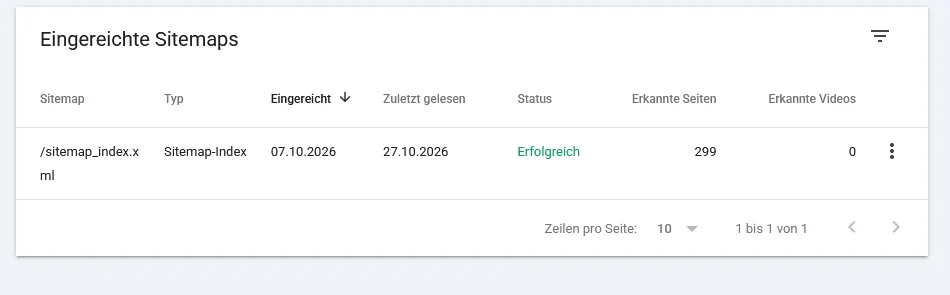
The sitemap report in Search Console shows whether Google could read the sitemap, when it last did so and how many pages it discovered. Discovered does not yet mean indexed (example arboro.de, October 2026; German interface).
For Bing, and therefore also for Microsoft Copilot, IndexNow offers an additional route. The store reports new and changed URLs itself instead of waiting for the crawler’s next visit. There are extensions for Shopware and Shopify, and some CDNs offer it directly. Google does not take part in IndexNow.
When a request achieves nothing
If a page is not included despite several weeks and clean technology, it is almost never Google’s fault, but the page’s. Typical reasons are product descriptions that appear word for word at many other retailers, categories with hardly any content, pages that hardly any internal link leads to, and many nearly identical pages competing with each other. More on this under duplicate content.
The solution then isn’t another request, but a better page: your own copy, sensible integration into navigation and internal linking, and a clear decision about which pages should go into the index and which shouldn’t. Which areas crawlers shouldn’t visit at all is described in the article on robots.txt for Shopware and Shopify.
Getting indexing problems in your store solved
If important products or categories of your Shopware or Shopify store aren’t arriving on Google, the arboro team checks Search Console, sitemap, server logs and store settings together and fixes the cause directly in the store. More on this under SEO for online stores.
Image source: @bakhtiarzein – stock.adobe.com
Author

Zoran Artmagic
Managing Director
In 2009, he started arboro in a tiny office in Heilbronn, and now it’s a thriving e-commerce and online marketing agency with multiple locations. Zoran worked freelancing as a software architect for big companies before making arboro his masterpiece. He values a good work atmosphere, equal communication, and customer focus. Nowadays, he's all about advising clients and finding talented staff for the ever-growing company. Plus, he's super passionate about evolving arboro's mission and company values.