
XML sitemap
 Reviewed by Zoran Artmagic ·

An XML sitemap is a file in which a website lists the addresses of its important pages for search engines. It helps a crawler such as Googlebot find pages faster, including those that are hard to reach via links. For online stores with thousands of products, categories and variants, it is the most important way to show Google which pages belong in the index at all.
What matters is how to classify it: a sitemap is a recommendation, not a command. It ensures that Google knows about a page. Whether the page is crawled and included in the index is still Google’s decision.
How an XML sitemap is structured
The format follows the Sitemaps protocol, which Google, Yahoo and Microsoft jointly defined in 2006. A simple sitemap looks like this:
<?xml version="1.0" encoding="UTF-8"?><urlset xmlns="http://www.sitemaps.org/schemas/sitemap/0.9"> <url> <loc>https://www.your-store.com/metal-raised-beds</loc> <lastmod>2026-11-02</lastmod> </url> <url> <loc>https://www.your-store.com/metal-raised-bed-200cm</loc> <lastmod>2026-10-28</lastmod> </url></urlset>
loc: the full address of the page, with protocol and domain. This is the only required element.
lastmod: the date of the last content change. Google uses it if it is reliably accurate and plans re-crawling accordingly. If the current date is set on every request, Google ignores it.
changefreq and priority: Google doesn’t evaluate these two elements from the protocol. They do no harm, but they don’t help either.
Limits and sitemap index
A single sitemap may contain at most 50,000 URLs and must not exceed 50 MB uncompressed. Larger websites split their URLs across several files and combine them in a sitemap index:
<?xml version="1.0" encoding="UTF-8"?><sitemapindex xmlns="http://www.sitemaps.org/schemas/sitemap/0.9"> <sitemap><loc>https://www.your-store.com/sitemap-products-1.xml.gz</loc></sitemap> <sitemap><loc>https://www.your-store.com/sitemap-categories.xml.gz</loc></sitemap></sitemapindex>
Sitemaps may be compressed with gzip. In stores, it makes sense to split them by page type, such as products, categories and guides. That way, Search Console shows separately for each type how many pages are in the index.
What belongs in a sitemap and what doesn’t
A sitemap should only contain pages that Google should also index. For every URL:
Status 200: no redirects, no error pages.
Indexable: no noindex, not blocked by the robots.txt.
Canonical: the main version of a page, not a variant whose canonical tag points to another URL.
In stores, this typically rules out: filter and sorting URLs, search result pages, cart and customer account, variant URLs with a canonical to the main product, and delisted products with a redirect. A sitemap full of URLs that Google shouldn’t index sends contradictory signals and makes the evaluation in Search Console worthless.
Special sitemap types
Image sitemaps: additionally list the images on a page. Interesting for stores, because product images are found via image search. More on this in the entry on Google Images.
Video sitemaps: describe videos with title, thumbnail and duration.
News sitemaps: for news sites in Google News, hardly relevant for stores.
hreflang in the sitemap: multilingual stores can link the language and country versions of a page directly in the sitemap instead of in the source code of every page.
How Google learns about the sitemap
In the robots.txt: a Sitemap: line with the full address. This way other search engines find the file too.
In Google Search Console: submit it under “Sitemaps”. There Google shows whether the file could be read and how many URLs were discovered in it.
In Bing Webmaster Tools: for Bing and therefore for Copilot.
Google discontinued the former ping service, which could be used to notify Google of a changed sitemap, in 2023. An up-to-date sitemap with a reliable lastmod is enough.
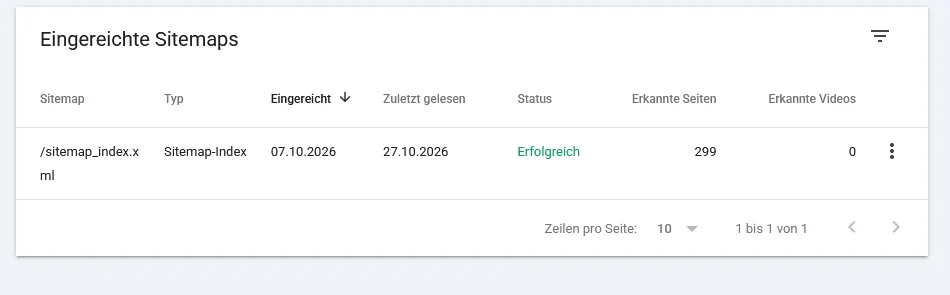
The sitemap report in Search Console shows status, last read and the number of discovered pages. Discovered does not yet mean indexed (German interface).
Sitemaps in Shopware and Shopify
Shopware 6 generates the sitemap automatically for each sales channel and domain, available at /sitemap.xml. In the sitemap settings you define whether it is updated live, via scheduled tasks or only manually. If the scheduled tasks aren’t running on the server, the sitemap stays at an old state and new products are missing from it. This is one of the most common reasons why new items take a long time to appear on Google.
Shopify also automatically generates a sitemap index at /sitemap.xml, with separate files for products, collections, pages and blog posts. Only products published to the Online Store sales channel are included. Individual pages can be excluded from the sitemap and search via the seo.hidden metafield. The sitemap itself can’t be edited directly.
More on the technical peculiarities under Shopware SEO and Shopify SEO.
Typical mistakes
Redirects and error pages in the sitemap: for example after a relaunch or when delisted products aren’t removed.
Filter, search or variant URLs: bloat the sitemap and contradict the canonical tag.
Wrong lastmod: always today’s date instead of the real change. Google then loses trust in the value.
Outdated sitemap: new products are missing because generation isn’t running.
Sitemap of the wrong domain: URLs with http instead of https, without www or from a test system.
Sitemap blocked by the robots.txt: then Google can’t read it at all.
Frequently asked questions
Do I need an XML sitemap?
For small, well-linked websites it isn’t essential. For online stores it is practically always useful, because many products are only reachable deep in the navigation and the range changes constantly.
Are all pages in the sitemap indexed?
No. The sitemap ensures that Google knows the pages. Whether they are included depends on quality, duplication and technology. How to check this is shown in the article on Google indexing.
Why is “discovered” higher than “indexed”?
Because Google doesn’t include every page it knows. A large gap points to weak or duplicate pages; more on this under duplicate content.
How often does the sitemap need to be updated?
Whenever pages change. In stores this happens automatically; what matters is that generation runs reliably.
Does the sitemap replace internal linking?
No. Pages that only appear in the sitemap and aren’t linked from any other page have a hard time with Google. The sitemap complements the navigation, it doesn’t replace it.